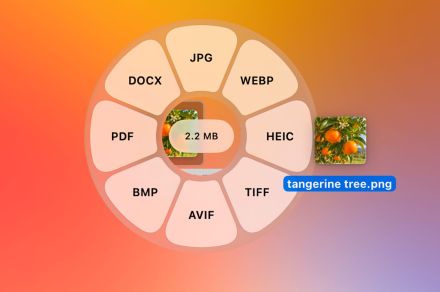
File conversion on Mac usually involves a frustrating routine of opening dedicated apps or relying on slow web tools that come with privacy risks. A new macOS utility called Tangerine aims to fix this completely. Launched recently by an independent developer, the app reimagines file management by giving you access to a powerful suite of conversion and editing tools with a simple drag and drop.
A simplified workflow for quick file conversions
Tangerine bypasses traditional user interfaces entirely. Instead of opening a separate window to upload and convert a document, you simply click and drag a file while holding the Shift key. This action summons a sleek radial menu around the cursor displaying all available formatting options for that specific file type.
meet tangerine. a mac app that lets you convert files with ZERO clicks: just hold shift and drag the file. also has other useful file modification tools.
— thameem (@th2049)
download now: https://t.co/47SkcMdE3x pic.twitter.com/JamVbMvdLf
In addition to basic format swaps, the tool wheel provides instant access to advanced features like video and image redaction, audio bleeping, and media compression. You can also trim videos, annotate images, remove metadata, and split or merge PDFs directly from your desktop or any Finder window.


Once you make a selection, Tangerine automatically drops the converted file into the exact same folder as the original. Additional shortcuts like dragging with the Command or Control keys reveal extra wheels for specific tools and quick actions like AirDrop. The app supports 275 conversion options and 26 file tools, along with 6 file actions.
Pricing and system requirements
That friction-free file conversion comes at a premium, though. Tangerine will set you back $29.99, but there’s a free trial available to let you test it out before committing. The free trial gives you 20 conversions to start, after which the app locks you down to just the action wheel. The app supports all Apple silicon Macs running macOS 13 or later.
If $30 is a bit too steep for a utility app, there’s a compelling, completely free alternative worth checking out. OpenShelf is an open-source menu bar app that uses a similar drag-and-drop action wheel to let you quickly convert, edit, or stash files on temporary floating shelves. It’s available for free, making it an easy pick for anyone who loves Tangerine’s feature set but can’t justify its premium price tag.