Spotify keeps adding new features lately. Last week, the company rolled out “Exclusive Mode” for desktop users to stream in the highest quality possible; last month, Spotify announced “Smart Reorder,” which automatically sorts your songs by BPM; and in January, the company’s AI-powered “Prompted Playlists” landed in the U.S. after an exclusive stint overseas. It’s still not easy to pick a favorite among other services like Apple Music, but Premium subscribers can at least say Spotify is giving them something for their money.
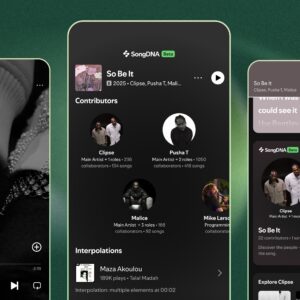
Now, the company is rolling out another new feature, one that actually seems like a cool way to learn about your music. On Tuesday, Spotify announced SongDNA, which shows you all the people who worked on a song, as well as all the samples and interpolations that song used. SongDNA lives directly under the lyrics tile in the player window. I already see it on my end, though Spotify does label the feature with a “Beta” tag to note that this feature is still in testing.
How Spotify’s SongDNA works
When SongDNA appears under a song, you’ll be able to see the artists who worked on it in one corner. That might include the main artist, but also any of the composers, producers, musicians, or writers who contributed. The SongDNA tile shows the main artist in a bubble, but tap the icon, and you’ll see a map of all the people involved. You can tap on any of these names to see how many other artists they’ve worked with, how many songs they worked on, and what their “top song” is (presumably, what the most popular song they worked on is on Spotify).
To the right of the artists’ bubble is a sample and interpolations bubble: Here, you’ll see all of the clips the artist or artists took from various other songs to incorporate them into their own track. On Kendrick Lamar’s “King Kunta,” for example, I can see they sampled a drum loop from “Kung Fu” by Curtis Mayfield, and took vocals from James Brown’s “The Payback,” among others. Spotify will tell you exactly where in each song the sample was taken from, and gives you a play button to listen. You also can scroll down to find songs that have sampled the song in question: “F The Disco” by Cavi samples vocals from “King Kunta” at 1:28, as does “Brain Cells” by Villain Park (at 1:59). Scroll down a bit more, and you’ll find any covers of the song available on Spotify. “8-Bit Misfits” has an awesome interpretation of the song that sounds like Kendrick wrote music for the NES.

Credit: Spotify
I’m an Apple Music guy, truthfully, but I have to say: This rocks (no pun intended). Most of us listen to our music without really knowing much about how it was put together—outside of the headlining artist, anyway. SongDNA makes it easy to learn more about how your favorite songs were made, where they pulled inspiration from, and who actually helped make the hit besides the singer or artist. You could follow up with the lead engineer or producer of your favorite song to see what other projects they worked on, or check out the full songs that were sampled to find new music to listen to. While it’s a bummer it’s only available for Premium subscribers, it’s a great move on Spotify’s part.
Does Spotify’s SongDNA use AI?
I reached out to Spotify asking whether SongDNA uses AI to retrieve this information, and, as it turns out, it doesn’t! For the most part, anyway. Here’s what a Spotify rep told me: “SongDNA is not a generative AI feature and does not use Large Language Models (LLMs) to create or predict information. This immersive music experience is built on official credits data we receive from artists and their teams, supplemented by community sourced data. While we use technology to visualize these complex relationships, the data itself is rooted in human-verified industry sources, not AI-generated content.”
While it’s not clear what “technology” was used to visual the relationships here, it’s refreshing to learn that the data here is all human-sourced. Spotify might use AI for the UI, but, unlike many new app features these days, this one isn’t going to hallucinate incorrect samples, or make up credits for songs.