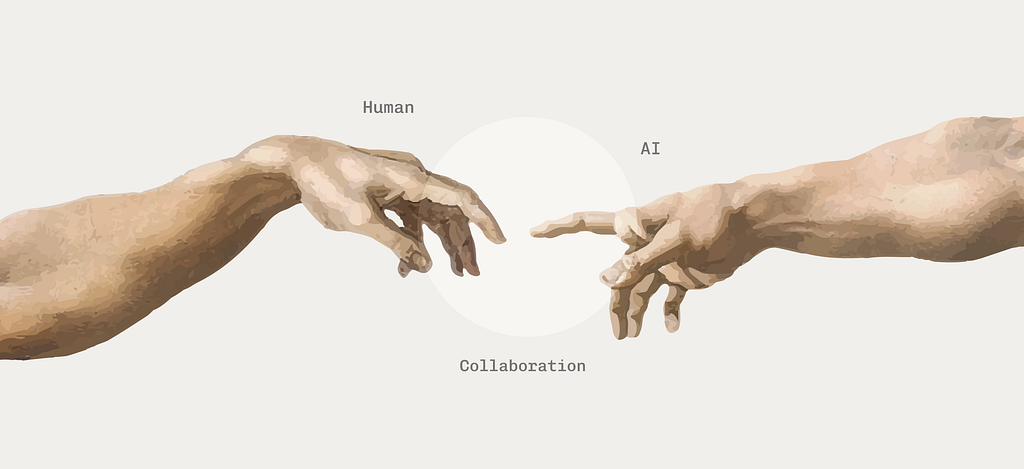
We’ve all lived a version of this story.
You start small — asking AI to refine an email. Then something a little harder, like writing a function in a language you barely know. Then a whole feature. Eventually you give it access to your files, your calendar, your codebase. At first it feels like an intern. Then it feels like a colleague. At some point, it even feels like the expert in the room.
At first, this feels incredible. A month of work compresses into a few days. Everything starts to revolve around building and shipping faster.
But at some point, the confident, seemingly omniscient AI hands the problem back to you. You stare at the error. It stares back. You don’t actually know how to solve it either, so you type “try a different approach” or “fix this” and hit send like you’re pulling the lever on a slot machine. Fingers crossed for a result that magically works — or at least looks like it works.
When moments like this happen, the instinct is to ask: how do we make the AI better next time? But AI will never be error-free, and there will always be situations it can’t handle. The more important question is: how do we design the system so the user can catch those moments before it’s too late, and stay sharp enough to actually solve them when they do?
This makes us rethink what a good AI tool actually does. It’s not just about making users work faster. Speed can mean decisions that no one carefully reviewed, alternatives that never got considered before the team moved on, and outputs that shipped without a real check. Sometimes the right thing is to might be slowing them down.
What’s more, if the AI is doing more of the work, the user is practicing those skills less — which raises a question we don’t ask often enough: how do those skills change over time, and what happens to the user in the long run?
We’ve been focusing a lot on how to make AI better. We should also talk about the other side: is there a way to make users better through interactions with AI. Because every AI tool is, whether the team building it intends to or not, training its users too. It’s shaping what they pay attention to, what they take on faith, which skills they keep using, and which ones they let atrophy.
Most AI completes tasks. The best AI tools make the user think, learn, and grow.
The good news is, this isn’t a new problem. Since Bainbridge’s Ironies of Automation (1983), cognitive ergonomics researchers studying aviation and nuclear plants have been mapping similar dynamics, and there are a lot of insights that can be applied to the field of GenAI.
Based on relevant research and articles, I’ve put together a framework and checklist for designers and system builders for designing human–AI collaboration that not only makes users work faster, but better.
The framework has four parts:
- Identify the task. Understand which type of the work are being handed over so that.
- Choose the human control level. Decide how much authority to delegate, based on what the work can tolerate going wrong.
- Calibrate trust. Make sure the user’s confidence in the AI tracks the AI’s actual reliability, so they can still catch mistakes when they matter.
- Design for coevolution. Build the tool so that the user grows alongside the AI, instead of quietly atrophying as the AI takes over.
1. Identify the task
Before deciding how much AI should do, break the task into its underlying steps. Based on Parasuraman and colleagues’ work on automation, most user-facing tasks pass through four stages:
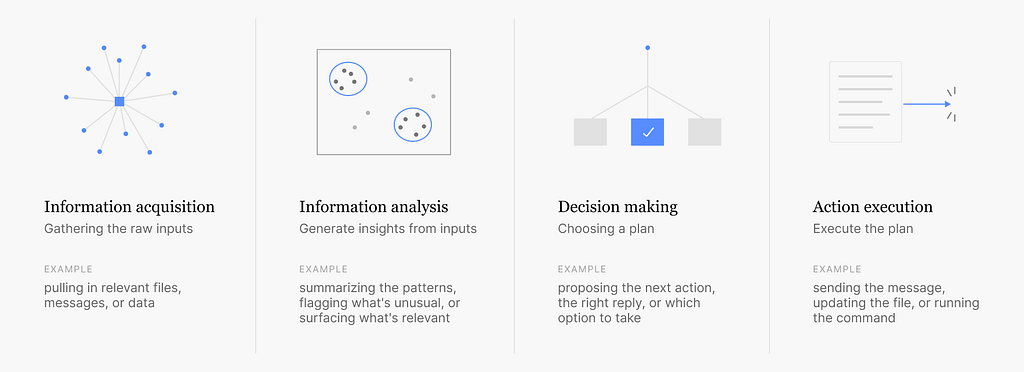
This matters because how much control we hand over to AI depends on the type of task at hand.
Checklist
- Which of the four stages does this flow involve?
- Can the user tell which stage the AI is currently in?
- Are there checkpoints between the stages? Can the user step in or stop the process at any stage?
2. Choose the human control level
We used to design how people interact with software. Now we’re designing how much they need to.
As John Maeda mentioned in Design in Tech Report 2026, we used to design how user execute the task, now in the context of human-AI collaboration, it is shifting towards designing how user evaluate the output.
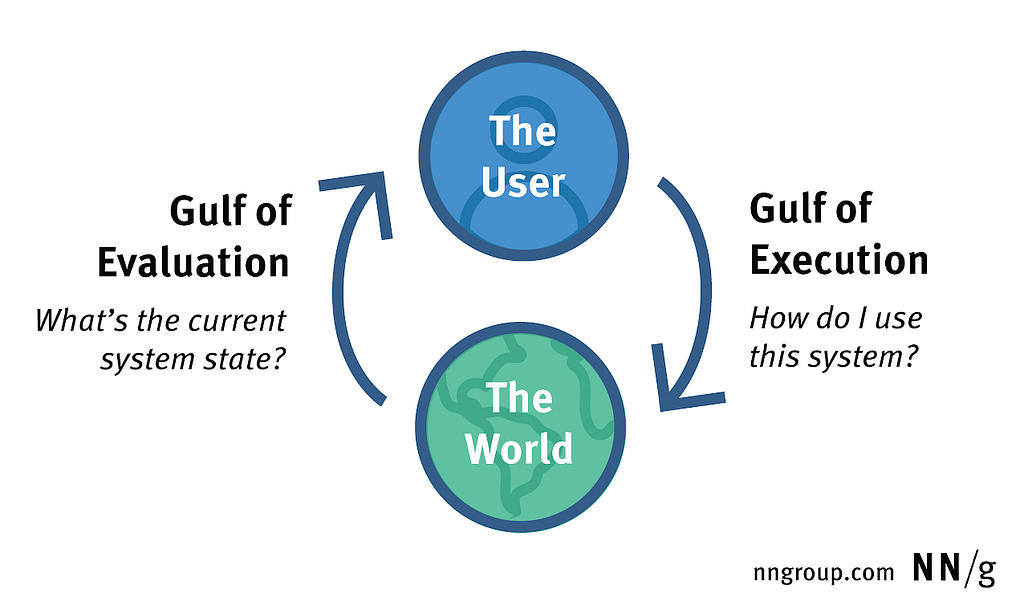
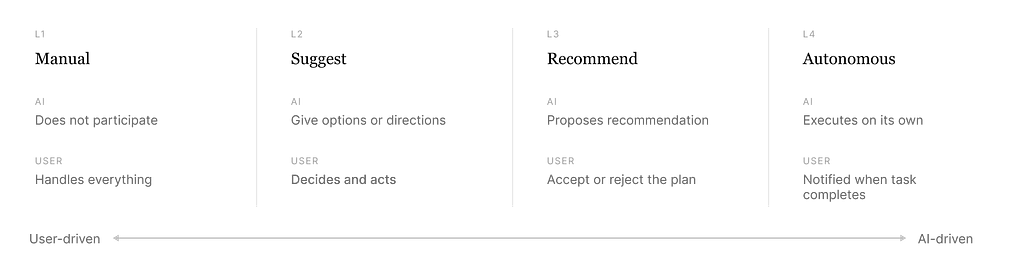
When we talk about human–AI collaboration, what we’re really talking about is which parts of the task we’re going to delegate to the AI, and what level of control the user retains.
This is similar to autonomous driving, where there’s fully manual driving, lane assist, and full self-driving (such as Tesla FSD). I categorize the human control level into the following:
How to choose
Picking the right level isn’t about how much the AI can do. It’s about how much the user should stay involved given the potential risk. A few dimensions to consider:
Cost of error. If something does go wrong, how bad is it? Cmd+Z and a confirmed payment are not the same risk class. If it’s easy to roll back (editing a doc, generating a draft), letting AI try it is acceptable. Medium risk is when the error is recoverable but takes effort (email already sent, PR submitted). If the task is irreversible or severe (financial transactions, legal decisions, medical diagnosis, data deletion), more human review needs to be in the loop — and a human needs to be the one to press the button.
Time-criticality. A medical or aviation context can’t tolerate the same human-in-the-loop pace a creative tool can. Counter-intuitively, higher time pressure often means more automation in execution but more human involvement in the decision before things go critical. This is because when the user takes over mid-emergency, they don’t have enough time to form a clear picture of the current situation, and may even make worse decisions (Bainbridge, 1983).
Checklist
- The system offers different automation levels based on task type and user capability.
- At least one of the decision and action stages keeps a human in the loop, so errors get caught earlier.
- High-cost or irreversible actions require explicit confirmation.
- Nice to have: the level is adjustable. New users who don’t yet understand the AI’s limits shouldn’t be given too much authority by default; experienced users can dial it up.
3. Calibrate the trust level
As users and AI work together over time, the right level of control keeps shifting. One of the main things users rely on to set that level is trust.
Trust is dynamic. It rises when the AI does something well, and drops when it makes a mistake. Left alone, it tends to drift toward one of two extremes, and both are failure modes. Good design keeps trust calibrated within a safe band: prompting the user to slow down when they’re starting to over-rely on the AI, and rebuilding confidence when they’ve started to abandon the tool entirely.
Misuse: when users trust the AI too much
Users accept AI output without reviewing it, even when the AI is wrong. They’ve stopped reading. The acceptance click has become a rubber stamp.
How to prevent misuse:
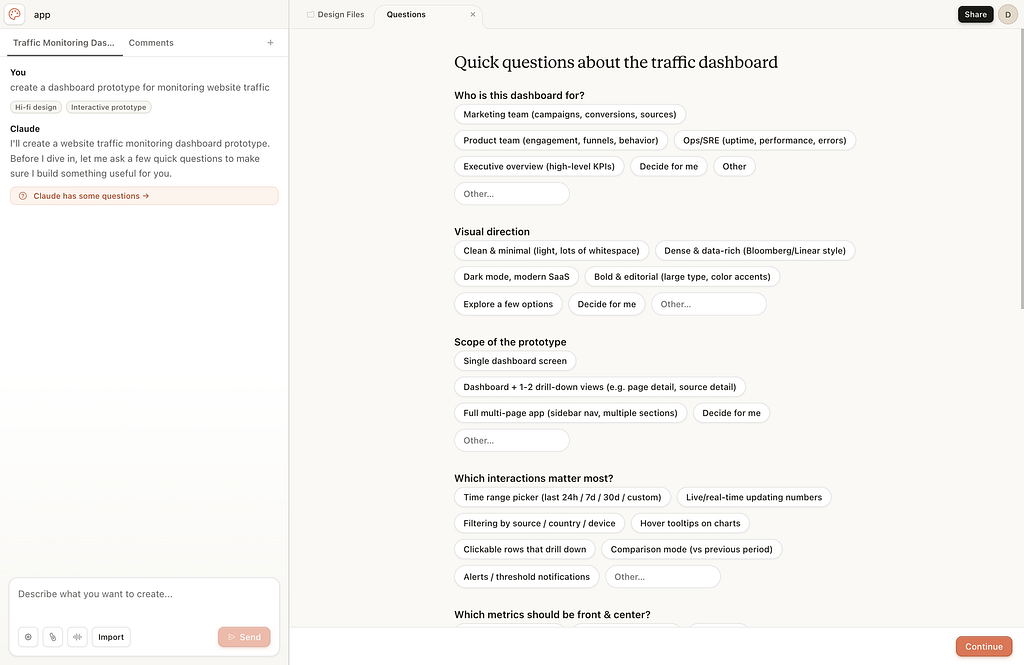
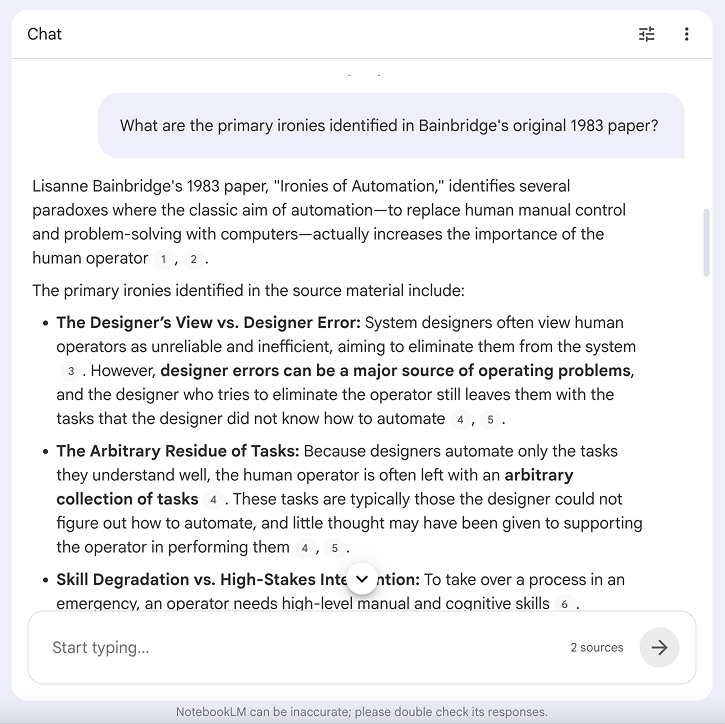
- Make the AI’s uncertainty visible. Distinguish between “the AI is confident” and “the AI is guessing.” Hoff & Bashir’s work on trust calibration calls this transparency. The user can only calibrate their trust if the system shows them what it actually knows.
- Don’t let the AI sound equally confident about everything. If the tone is the same whether the model is certain or hallucinating, users have no signal to work with.
- Add friction at the decision points that matter most. Force the user to actually look before they can continue. This isn’t friction for friction’s sake — it’s a deliberate pause at the step where a missed error is most expensive.
- Occasionally inject a moment of human judgment. A workflow where every step is one-click-accept trains the user to stop thinking. Mixing in steps that genuinely require their input keeps them in the loop.
Disuse: when users trust the AI too little
The other failure mode is the opposite end. If the AI cries wolf too often, suggests changes that don’t fit, or makes a visible mistake early on, users learn to ignore it. Eventually they stop using the feature because of the bad impression, even if the feature is actually helpful.
How to prevent disuse:
- Protect the first impression. Early errors damage trust disproportionately (Manzey et al., 2012). A user who sees the AI fail in their first session will discount the next ten correct outputs. Onboarding is the highest-leverage place to invest, and the AI’s first few interactions should be ones it can confidently handle well.
- Watch the false alarm rate. Lee’s work on collision warning systems found that a 35:1 false-alarm-to-real-alarm ratio led drivers to simply turn the warnings off. The same principle applies to AI assistants. If the AI interrupts, suggests, or flags things when the user didn’t need it to, they’ll learn to dismiss it on autopilot. Restraint is part of the design.
- Explain why the AI got it wrong. When the AI does fail, an explanation helps rebuild trust faster than silence does (Dzindolet et al., 2003). “I missed this because the input was ambiguous” is a much better recovery than a generic error — or worse, no acknowledgment at all.
How to measure trust
Acceptance rate, override rate, and time-to-confirm are useful proxies for how engaged users are with AI output. But these metrics are not “higher is better.” Interpretation matters: a high acceptance rate paired with rising output quality means the AI is genuinely helping. The same acceptance rate paired with flat or declining quality means users have stopped reading.
Checklist
- I’ve considered misuse scenarios and built friction into the design to prevent them.
- I’ve considered disuse risk and designed the first-time experience to build trust deliberately.
- There’s a mechanism to recalibrate trust when users drift toward over-reliance — something that prompts them back into engagement before a costly error happens.
4. Design for co-evolution
We want to design systems that make both AI and humans better: AI becomes more attuned to the user’s context and preferences, and the user’s own judgment, skills, and critical thinking genuinely develop over time.
This means protecting the user’s long-term skill development. For experienced users, make sure their core skills don’t decay from underuse. For users without much domain expertise, this collaboration can become a good opportunity to learn: show the AI’s reasoning, surface patterns the user wouldn’t have noticed alone, and help them build judgment alongside output.
Sometimes designing for long-term impact also means adding intentional friction to the short-term experience, as I mentioned earlier.
Measuring how a user’s skill evolves is still an open challenge. In research settings, the standard approach is to test the same task with and without AI assistance and compare.
In actual products, that’s harder to implement cleanly. But it doesn’t have to be a formal test. Even lightweight mechanisms that help users see where their own capability ends and the AI’s begins (such as occasionally asking them to weigh in before the AI suggests an answer) can give users a clearer sense of their own capability boundary.
It’s also worth holding the question loosely, because what counts as a “core skill” is itself shifting. Execution skills used to dominate. But nowadays, evaluation skills — knowing whether an output is right, where it could be wrong, and what to do about it — are becoming the more important ones to protect. The skills we design to preserve today may not be the same skills that matter most a year from now, and the framework has to leave room for that.
Checklist
- I’ve thought about what the user’s skill level will look like a year into using this product.
- The system provides ways for users to maintain (and ideally grow) their core skills.
- I’m not optimizing short-term engagement at the cost of long-term capability.
Final thoughts
There’s an idea I keep coming back to from interaction design:
Designers engineer relationships, not simply technology.
— Lee & See (2004)
It feels especially true for designing human–AI collaboration. The four parts of this framework are essentially about the relationship between a person and a system that’s smarter than them in some ways and more limited in others — and how that relationship evolves over months and years of use.
Going back to the “slot machine” moment from the beginning — the user staring at an error, typing “fix this” and hoping for the best — that moment isn’t really a failure of the AI. It’s a failure of the relationship. The user has been trained, by the design of the tool, to outsource the thinking and trust the output. When the AI hands the problem back, there’s nothing left to catch it.
The job isn’t to make the AI smart enough that this moment never happens. It’s to design the relationship so that when it does, the user has the skills, the trust calibration, and the judgment to actually solve the problem.
That’s the version of “human–AI collaboration” worth building toward. Not faster users, but better ones.
References
Bainbridge, L. (1983). Ironies of automation. Automatica, 19(6), 775–779. https://doi.org/10.1016/0005-1098(83)90046-8
Dzindolet, M. T., Peterson, S. A., Pomranky, R. A., Pierce, L. G., & Beck, H. P. (2003). The role of trust in automation reliance. International Journal of Human-Computer Studies, 58(6), 697–718. https://doi.org/10.1016/S1071-5819(03)00038-7
Hoff, K. A., & Bashir, M. (2015). Trust in automation: Integrating empirical evidence on factors that influence trust. Human Factors, 57(3), 407–434. https://doi.org/10.1177/0018720814547570
Lee, J. D., & See, K. A. (2004). Trust in automation: Designing for appropriate reliance. Human Factors, 46(1), 50–80. https://doi.org/10.1518/hfes.46.1.50_30392
Maeda, J. (2026). Design in Tech Report 2026: From UX to AX. Medium. https://johnmaeda.medium.com/design-in-tech-report-2026-from-ux-to-ax-f9d83164f4d2
Manzey, D., Reichenbach, J., & Onnasch, L. (2012). Human performance consequences of automated decision aids: The impact of degree of automation and system experience. Journal of Cognitive Engineering and Decision Making, 6(1), 57–87. https://doi.org/10.1177/1555343411433844
Parasuraman, R., Sheridan, T. B., & Wickens, C. D. (2000). A model for types and levels of human interaction with automation. IEEE Transactions on Systems, Man, and Cybernetics — Part A: Systems and Humans, 30(3), 286–297. https://doi.org/10.1109/3468.844354
Wroblewski, L. (2026, March 10). Finding the role of humans in AI products. LukeW Ideation + Design. https://www.lukew.com/ff/entry.asp?2144
Most AI tools make users faster. The best AI tools make users better. was originally published in UX Collective on Medium, where people are continuing the conversation by highlighting and responding to this story.