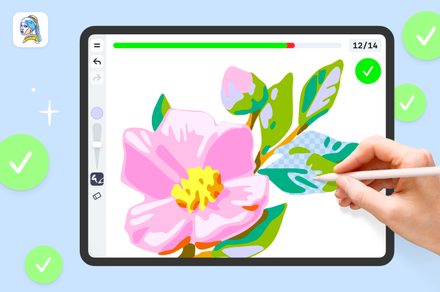
iPad owners searching for a drawing app for beginners can often find themselves with an app that doesn’t really suit their specific needs, or worse, can confuse them in the process. Complex interfaces, dense brush menus, and poor compatibility with tablet tools like Apple Pencils can be real barriers for new learners looking to use the app for learning how to draw.
This is where guided drawing trainers like ArtWorkout stand apart.
An iPad drawing app for beginners, ArtWorkout offers a structured, ready-made path for anyone who wants to learn. With step-by-step lessons, stylus-friendly design, and a real-time progress bar that shows how each stroke is going, the app aims to help complete newcomers build a drawing habit that fits easily into everyday life.
What makes an app “good” for learning how to draw?
A strong iPad drawing app for beginners essentially needs to act as a low barrier to entry. That means presenting a clean and intuitive workspace and offering guidance that takes users through each step of the experience, so newcomers are never left guessing about the purpose of each tool or the order of each step.
A good design, one with clear and consistent visual cues, a steady progression, and minimal interface noise, is especially helpful for users to focus on the process of drawing and not on how to find different features on the app. When an app delivers these fundamentals well, it turns a tablet into a place where practice feels approachable instead of intimidating.
ArtWorkout was built with those ideas in mind, combining structured guidance with real-time feedback, like a personal trainer would, that keeps learners oriented through every stage of a drawing.
Created by developer Aleksandr Ulitin, the app is organized to give drawing beginners a clear sense of direction from the moment a lesson begins. Its interface walks users through each part of the drawing, starting with the simple guiding lines that form the basic shape and then moving into details, color, and shading. Plus, it comes with a green-and-red progress bar that reacts to every stroke, making it easy to see how closely it matches the desired drawing.
Plus, with over 2,500 tutorials and features like the Lesson of the Day and themed categories including kawaii characters, animals, human figures, landscapes, classic art, and shading exercises, the app gives users simple and varied entry points so they always have something new to practice.
Inside ArtWorkout’s stroke evaluation system
A defining feature of ArtWorkout is its real-time stroke evaluation, a system that gives learners immediate clarity on how each line is supposed to form on the screen. This kind of instant guidance is especially valuable on iPads and similar devices, where understanding stroke direction, angle, and overall flow is a core part of learning to draw confidently.
The evaluation system examines the full formation of every stroke, comparing it to the intended shape so it can detect even small differences in proportion, direction, or placement. It tracks the angle and curve of the user’s line as it develops, catching subtle (and not-so-subtle) deviations from what the exercise calls for. These measurements are then shown in a dynamic progress bar that shows how accurately the entire stroke aligns with the guide. If the inaccuracies outweigh the correct portions, the app prompts the user to start the step again.
By making this sort of feedback visible, the app lets learners keep track of how well they’re doing as they draw, instead of simply telling them they got the exercise right or wrong after the fact. As a result, each stroke becomes a practice attempt and a small lesson in how to improve.
How does ArtWorkout fit Apple Pencil or tablet styluses?

The pairing of the Apple Pencil with ArtWorkout’s accuracy system works especially well on tablets, since the Pencil’s pressure and tilt sensitivity allow the app to pick up small shifts in line weight, steadiness, and motion that beginners might not notice.
For learners still figuring out hand control, this subtle detection can be an effective guide on how to develop stronger drawing habits, as they can see through their own strokes what feels correct and where they start to drift.
On iPads, the low-latency feel of the Apple Pencil makes these interactions smooth enough that the feedback almost blends into the act of drawing. This also applies to stylus-friendly Android tablets, which give the accuracy engine the consistent data it needs to stay helpful without getting in the way.
Encouraging users to incorporate drawing into their routines
The main thesis behind ArtWorkout is that building a drawing habit on an iPad becomes easier (and more rewarding) when each session feels doable.
ArtWorkout encourages this by offering short lessons that fit naturally into a daily routine: instead of scrolling during a 15-minute break, learners can spend that time practicing line control and picking up small skills that add up. Over repeated sessions, these quick exercises are meant to help form a steady drawing habit, supported by visible progress that users can watch unfold over time.
The app also makes practice feel social through its Multiplayer Mode, which lets users join live drawing sessions with people from around the world. It turns drawing into a shared experience, a low-pressure space where beginners and seasoned artists alike can sketch together and enjoy the process.
Together, these features add up to an experience that stays low-pressure while still inviting users to come back and engage more deeply over time. Founder Aleksandr Ulitin describes this as the heart of the app: a place where people can return to creativity without fear of doing it “wrong.” In his own words, “My goal for ArtWorkout is to show people the importance of inspiration, skill, and simply showing up every day, even if the practice feels a little silly at first,” he says.
The simple benefits of iPad drawing apps for beginners
ArtWorkout’s platform is an effective and accessible starting point for anyone learning to draw on a tablet. Its step-by-step approach, wide range of lesson themes, and built-in progress checks give beginners a clear sense of where they are in a lesson and what comes next without making them feel rushed or judged.
For any brand new or experienced tablet owners, especially those working with a stylus for the first time, this kind of gentle structure can make digital drawing feel far less intimidating and more like an activity they’d look forward to doing every day. And that’s where ArtWorkout shines: it keeps the lessons approachable, offers steady feedback, and supports the styluses people already use. The goal isn’t to pressure newcomers into mastering technique overnight, but to give them a space where they can feel empowered to improve, one relaxed practice session at a time.
Digital Trends partners with external contributors. All contributor content is reviewed by the Digital Trends editorial staff.