
Claude doesn’t know who you are. Here’s how I fixed that.

In March I switched from ChatGPT to Claude. The sessions were better, but for the first four to six weeks there was a tax I kept paying at the start of every new chat.
I’d set up a Cowork project for each design stream I was working on. Each one had its own product context, team context, what I wanted from Claude as a collaborator. That helped. But session after session, I was still re-explaining things that had nothing to do with any specific project: my voice, my principles, how I run a design critique, the feedback I’d given last Tuesday that I didn’t want to give again. Decisions I’d worked through in one project never transferred to another. A clarification that cost me ten minutes in one session was gone the next time I opened a different one.
For a while I thought the fix was tighter project instructions. So I tightened them. Then tightened them again. Marginally better. The correction loop didn’t go away.
The problem wasn’t my prompting. It was structural.
How these systems actually work
Every session, Claude starts from zero. It doesn’t carry memory between chats. It doesn’t remember the disagreement you had two weeks ago, or the principle you had to explain three times before it stuck. Project instructions tell Claude about the project. They don’t tell it about you.
That gap is small at first. It widens over time. The more you use AI as a collaborator (and the more the quality of the collaboration matters to you), the more you feel it.
I started asking a different question: what if you prompted Claude once, and it remembered?
Not for one session. Every session.
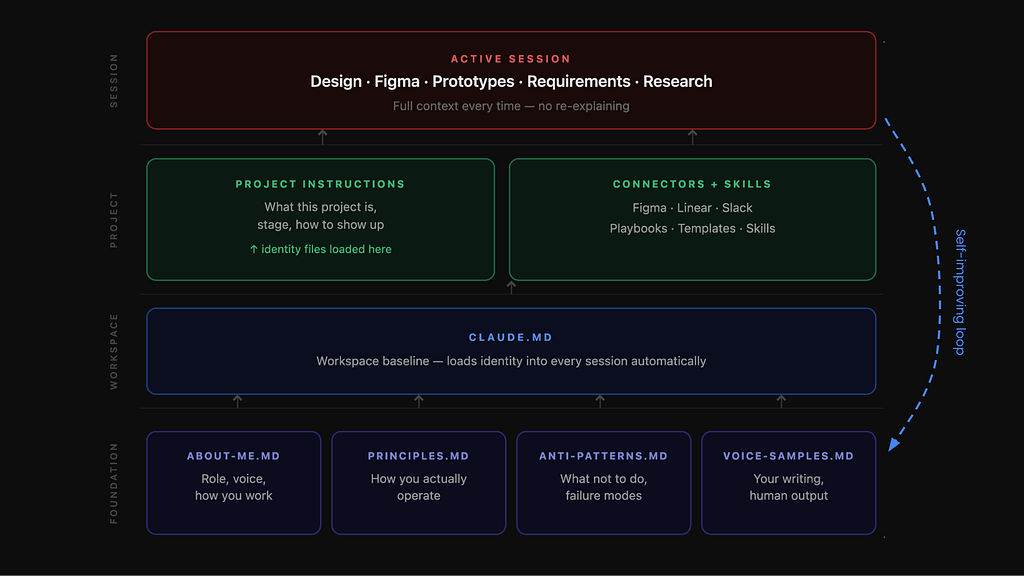
That’s the idea behind identity files
The fix is to give Claude a persistent picture of who you are through an identity layer: a set of files that Claude reads before every response, regardless of which project you’re in. You write them once. Every session starts with them already loaded.
Four markdown files that Claude reads before every response. You write them once. They live at the workspace level, not inside any project, which means they follow you everywhere: into every project, every Figma session, every design critique.
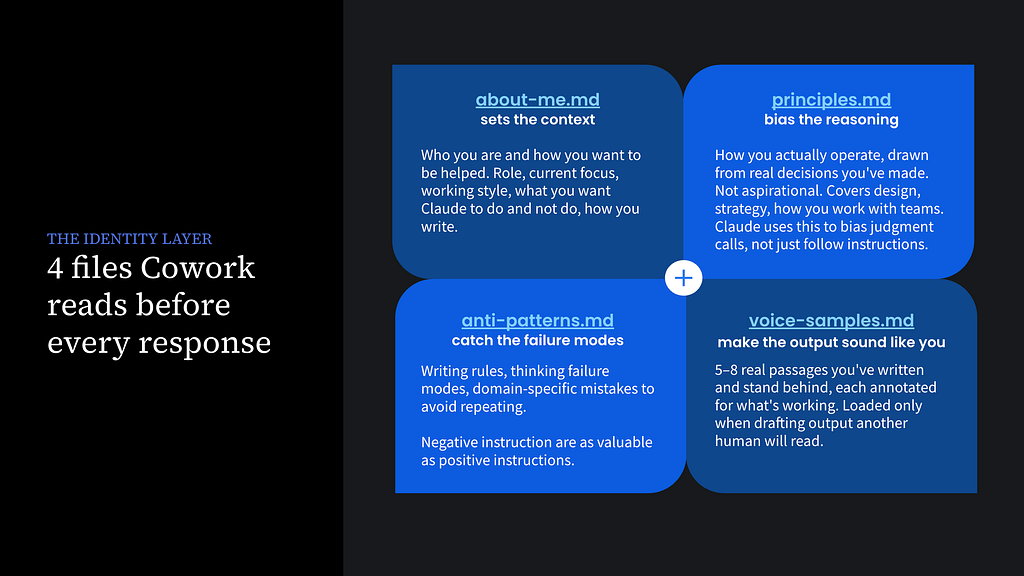
about-me.md is your working brief. Your role, what you’re building right now, how you want to be helped, what your strengths are and what you’d rather delegate. Not a LinkedIn bio: a brief for a collaborator who’s about to start working with you. Mine has five sections:
- general history
- what I’m working on right now
- what I work best on
- what I want from Claude (how I want to be helped)
- how I write
principles.md is how you actually operate. Not values in the abstract: decisions you’ve made, things you’ve changed your mind about, how you approach tradeoffs. These aren’t instructions for Claude. They’re the real operating principles behind how I think, so that when Claude is reasoning through a problem with me, it’s drawing on the same underlying framework. Mine includes things like:
“Speak from evidence, not opinion.”
“Stage your bets.”
“Quick wins buy time for strategy.”
anti-patterns.md is the negative space. The failure modes, writing rules, and mistakes you’ve made enough times that they’re worth documenting. Designers think in constraints; this file is just that, applied to a collaborator. Mine covers things like:
“Don’t act without showing me a plan first. Even when you’re confident.”
“Don’t fabricate stats when uncertain; flag the gap instead.”
“Don’t delete without proposing the change and waiting.”
“Don’t lead with conclusions when I haven’t seen the evidence.”
voice-samples.md is 5–8 real passages you’ve written and stand behind. This one surprises people. Samples beat rules every time. You can write “be direct and concise” in a file and Claude will apply its own interpretation of what that means. Or you can show it three paragraphs you’re actually proud of, and it learns what direct and concise means for you specifically. I annotated each sample with what’s working (the move being made) so it’s not just mimicking sentences but understanding the underlying pattern.
Building them doesn’t require starting from scratch
Most people don’t have this set up — not because it’s too much effort, but because there’s no obvious path to doing it. No one tells you to. This is what that path looks like.
You’re not writing these files cold. You’re synthesizing things you’ve already made. Grab a case study you’ve written. A performance review. A LinkedIn bio. Old Slack threads that capture how you think. Articles you’ve published. The material exists. It just hasn’t been organized into a form Claude can use.
The process I follow: share that material with Claude in a session, and have it interview you one section at a time. It drafts based on what it reads. You react to the drafts. After about 30–45 minutes, you have a working system.
There’s no instruction manual for this. No right way to set it up. I’ve seen people build systems with thirty files and an elaborate taxonomy. Mine started with four files and a few hundred words each. Both approaches can work. The important thing is getting something in place and refining it over time.
I created a Cowork identity layer setup playbook.md that walks through the whole process: it guides Claude to interview you section by section, drawing from your existing writing, and builds out each file from what you share. It’s what I wish I’d had when I started.
The system updates itself
Here’s the part that makes this worth the setup.
You don’t maintain these files manually. Memory from conversations gets consolidated back into the identity files over time. My principles file actually instructs Claude to flag improvements when it notices a gap (when it’s correcting the same mistake twice, or when something comes up in conversation that isn’t captured anywhere). Claude won’t catch everything on its own mid-session, so I also set up a weekly scan that looks for patterns in things I’ve corrected or clarified and integrates them into the identity files.
The longer you use the system, the sharper it gets. Each correction that gets consolidated is one fewer correction next session. The compounding is real and it’s relatively fast: even a thin about-me file changes the first session noticeably, and after a few weeks of use, the collaboration feels qualitatively different from where it started.
What changes
The re-explaining tax mostly disappears. Claude knows my voice well enough that I can say “draft a crit summary” without walking through what my crits sound like. It knows my principles well enough to apply them in a novel situation without me restating them. When it misses, I correct it, and that correction, if it’s worth keeping, gets added to the right file.
What I didn’t expect: the files also make me sharper. Writing anti-patterns.md forced me to articulate failure modes I’d only noticed implicitly. Writing principles.md made me go back through real decisions and ask what I was actually optimizing for. The act of building the identity layer is clarifying in its own right, separate from anything Claude does with it.
The setup takes an afternoon. The system then runs mostly on autopilot. If you’re paying the re-explaining tax at the start of every session, this is the fix.
The playbook for setting this up, and scrubbed versions of my four identity files, are all in this GDrive folder.
If you want to see what the collaboration looks like once this foundation is in place, I’m writing a companion piece on how I use Claude as a design collaborator day-to-day — the persistent project setup, what a session actually looks like, and the Figma workflow. Coming soon.
How to stop re-explaining yourself to Claude was originally published in UX Collective on Medium, where people are continuing the conversation by highlighting and responding to this story.