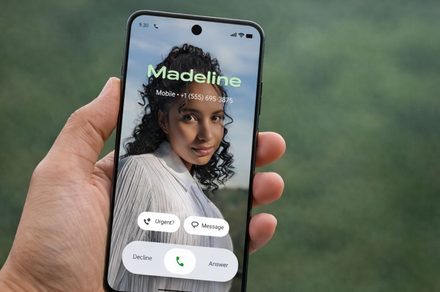
Android phones now let you personalize how you appear on a call with the Calling Card feature in the Google Phone app. Instead of a basic contact photo, you can create a full screen visual card that appears during calls.
You can add a photo, adjust how it looks on the screen, and customize the name style that appears when you call someone or when they call you. The feature is part of a recent update to the Phone app and works on devices running version 182 and above.
Once a calling card is created, the image and text style will appear during incoming calls, outgoing calls, and even when the device is locked.
How to set up a calling card

Follow these steps to create your calling card.
- Open the Phone app.
- If you see an Introducing Calling Card banner at the top of the screen, tap Get started. Alternatively, you can tap the Menu icon and select Settings > Calling Card
- Tap Add and choose the contact you want to create a calling card for.
- Select a photo from Gallery, Google Photos, or your camera.
- For customization, you can adjust the image by moving it around or pinching to zoom until it fits the preview. To add effects to the image, tap Effects.
- Tap Next once the photo is positioned correctly.
- Choose the font style and color for the contact name.
- Tap Done to finish creating the card.
After saving it, the customized screen will appear whenever that contact calls you or when you call them.
How to update a calling card

You can edit or replace your calling card at any time.
- Open the Phone app and select a contact.
- Tap Edit > Change > Change Calling Card.
- Choose a photo from Gallery, Google Photos, or your camera.
- Update the photo position, font style, color, or add effects.
- Save the changes.
Calling cards can make the Android call screen feel more personalized while helping you quickly recognize contacts during calls.
Google is also testing new privacy tools for contacts, including a feature in Android 17 designed to keep your contact information more private during calls and interactions.