Google has released Android Canary build 2604 (ZP11.260320.007), containing a few new experimental features. Before anything else, a quick heads up: Canary builds are not meant for everyday use. They can be buggy and unstable, and features introduced here might not always make it into the final stable release.
If you’re a developer who wants to test new builds and get ahead of upcoming changes, Canary is right up your alley. But if you are a regular Android user, I would recommend installing it only on a secondary device, and not your daily driver Android phone.
This release supports system images for a long list of Pixel devices, from the Pixel 8 through to the Pixel 10 Pro, so most recent Pixel owners are covered.
So what has changed?
According to Google’s Mishaal Rahman, two new UI changes are being tested with the new build.
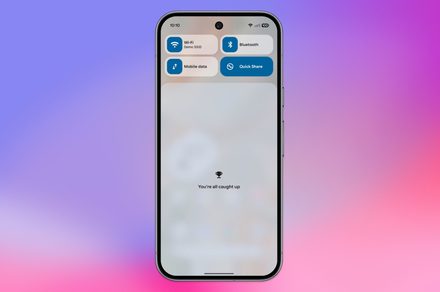
The first one is a notification shade update. Once you’ve cleared all your notifications, your phone shows you a “You’re all caught up” message instead of “No notifications.” It’s a small, humanizing touch, which feels nicer to read.

The second change involves the app shortcuts menu. If you long-press on an app icon, you’ll notice the shortcuts menu is now collapsed by default. When you tap to expand the shortcuts, the actions menu automatically collapses.

This has been done to keep things organized and less overwhelming, especially for apps that throw a dozen options at you at once.
That being said, it does introduce an extra step for anyone who uses shortcuts, as they would have to first tap to expand the shortcut menu.
Will these changes make it to the stable build of Android?
That’s the thing with Canary builds. There are no guarantees. It would depend on how the testers react to these features.
If you want to test these features on your phone, remember that once you flash a Canary build, you cannot revert to a stable build without a full data wipe. So be very sure before you install it.