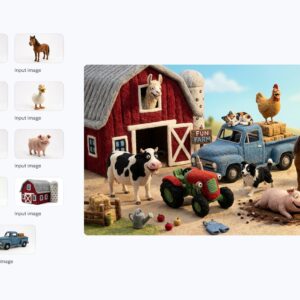
Last year, Google’s Gemini AI took a major step forward in image generation with the launch of its Nano Banana upgrade—perhaps as much due to its quirky codename as its impressive capabilities—and now the next iteration is here. Nano Banana 2 is another notable upgrade for AI image-making, and it’s currently rolling out to all Gemini users.
Nano Banana 2 is a combination of the original Nano Banana and the Pro version that followed a few months later. It’s essentially Nano Banana Pro at faster speeds, as noted in Google’s announcement, though Nano Banana Pro is also sticking around for those on Plus, Pro, and Ultra plans for situations where detail and accuracy matters more than speed.

Credit: Lifehacker
If you’re keeping track of the underlying, technical names for these models, Nano Banana is “Gemini 2.5 Flash Image,” Nano Banana Pro is “Gemini 3 Pro Image,” and Nano Banana 2 is “Gemini 3.1 Flash Image” (reflecting the upgraded capabilities, at “flash” speed).
What Nano Banana 2 can do
Nano Banana 2 has inherited much of the feature-set of Nano Banana Pro, bringing with it advanced world knowledge (so you can add in real time information like weather forecasts), and accurate and legible text (often a failing of early AI image models). Google is also talking up its subject consistency, ability to follow detailed instructions, aspect ratio and resolution control, and visual fidelity.

Credit: Lifehacker
While Nano Banana 2 is now available for all users, there are usage limits, as you would expect. You can create 20 images a day if you’re not on any subscription, 50 images a day as an AI Plus subscriber, 100 images a day with AI Pro, and 1,000 images a day with AI Ultra. (Google does caution that “limits may change frequently” based on demand).
You’ll see Nano Banana 2 replacing Nano Banana Pro pretty much everywhere you use Gemini, including in AI Mode for search and Google Lens. As always, generated pictures will be marked with Google’s SynthID technology that tags images as AI-made.
Picking apart what’s actually changed here isn’t all that easy, but essentially, free users previously had very limited access to Nano Banana Pro—sometimes as few as one or two generations a day, depending on general demand. Thanks to the improved efficiency of Nano Banana 2, these users can now create many more pictures with a model that almost matches the quality of Pro (at least until Google tweaks the usage limits again).
For paying users, Nano Banana Pro remains available, though Nano Banana 2 will be the default. That shows that Pro is still slightly better (if slower), and Google talks about it being more suitable for “high-fidelity tasks requiring maximum factual accuracy” and where “additional detail” is required.
Testing Nano Banana 2

Credit: Lifehacker
All of which is to say, once you start testing out Nano Banana 2, you might not think it seems massively different to Nano Banana Pro—you’ll just get your picture back more quickly. I’ve been putting the new model through its paces with a variety of different prompts, and it certainly impresses, even if it’s not yet at the stage where its results are flawless every time.
TO start, select Create image in the Gemini app and you’ll see there’s a new template feature available: You can pick from presets like Gothic clay or Oil painting and then add to the prompt, or just type out a prompt from scratch as normal. As before, you can also create a starting image (or multiple images) for Gemini to work from, via the + (plus) button.

Credit: Lifehacker
If you are signed up for Gemini’s AI Plus, AI Pro, or AI Ultra plans, once Nano Banana 2 has rendered your picture, you can tap or click on the three dots underneath it and choose Redo with Pro to get the same prompt rendered again with the aid of the extra thinking power of Nano Banana Pro (though this does seem to somehow delete the image template, if you selected one).
In one of my tests, I asked Gemini to produce a papercraft style weather forecast for New York—making use of image generation, real time information, and text rendering—and it completed the task well, using both Nano Banana 2 and Nano Banana Pro. The two models came up with quite different but equally high-quality results. As expected, the Pro model offered slightly more detail.

Credit: Lifehacker
I also asked tested out landscape painting and infographic creation, and even had it make a comic strip charting the opening moments of Bleak House by Charles Dickens (one for the copyright lawyers to look into). The end results were mostly impressive across the board, with text and graphics that were accurate, styles that matched the instructions, and few errors.
AI images still aren’t all the way there
These models aren’t perfect. Words are occasionally misspelled, the physics of images are occasionally wonky (AI still can’t faithfully recreate the real world), and these graphics still have the generic feel of something that’s been trained on lots and lots of previous content, rather than something that’s actually original.
How Nano Banana 2 compares to Nano Banana Pro

Credit: Lifehacker
It’s difficult to compare Nano Banana 2 and Nano Banana Pro directly, as obviously the prompt gets redone from scratch each time, so you get something original when you pick Redo with Pro rather than a tweak of the first image you had. Overall, it does feel as though Pro still has the edge in terms of quality and subtle touches, but in certain cases I preferred what Nano Banana 2 served up.
After plenty of test runs, it feels as though the biggest gain right now is in the way Gemini can pull information from the web (like weather conditions or specific details) to create imagery. These models are also getting better at working in different styles, and leaving behind fewer and fewer giveaways that the pictures were made by AI. How you feel about that will vary from person to person, of course.