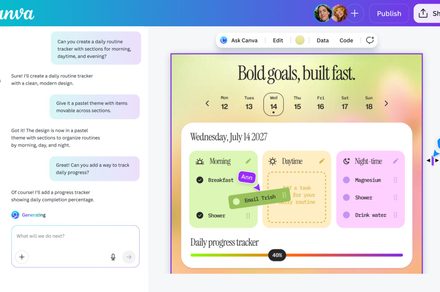
Canva‘s AI 2.0 update goes beyond its new conversational design workflow and app integrations. It also introduces automation and improved coding tools aimed at simplifying repetitive tasks and making it easier to create more advanced experiences without technical expertise.
Automate recurring work in the background
Canva’s new scheduling system allows users to set up tasks that run automatically, even when they’re offline. This includes generating batches of social media posts tailored for different platforms, preparing daily meeting briefings based on emails and calendar events, or translating content into multiple languages.

Users can also schedule more complex workflows, such as generating weekly content or summarising incoming information on a recurring basis. These tasks run in the background and are ready when users return, effectively compressing hours of manual work into a few automated steps.
For example, a marketing team could schedule campaign assets across channels every week, while a manager could receive auto-generated summaries of upcoming meetings each morning. These automated workflows reduce the need for constant manual input and help ensure routine tasks are completed on time.
Create and edit interactive projects without code
The platform is also expanding its no-code capabilities with Canva Code 2.0, which allows users to generate interactive, responsive experiences using simple prompts instead of writing code. This includes things like forms, interactive elements, and embeddable content that can be used across presentations and websites.

A new HTML import feature takes this further by letting users bring in existing or AI-generated projects and edit them visually within Canva. Instead of regenerating code for every change, users can refine specific elements directly in the editor, making iteration faster and more flexible.
This approach is similar to emerging AI-powered coding tools like Rplit or Cursor, which generate functional apps from prompts. However, Canva focuses on making these outputs easier to edit, customize, and publish with a visual interface, lowering the barrier for non-technical users.