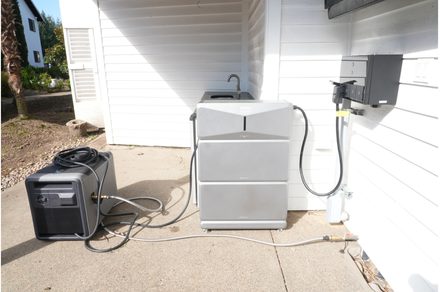

“A modular approach to backup power that actually grows to fit how people live, not just how systems are spec’d.”
- Highly expandable system: add batteries, more circuits, or parallel systems.
- Seamless transition during outages
- Handles surges from the likes of A/C or well pumps
- System runs without internet after setup, utilizes Bluetooth for local access
- A custom natural gas hose needed for Smart Generator 5500
- App interface has a minor setup learning curve
- 130-pound battery modules make installation a heavy-lifting affair
Instant Insight: Your Home, Just Uninterrupted
Whole-home backup power has always been one of those things that sounds great in theory, especially where I live. Outages here aren’t rare, and when they happen, they’re more than just an inconvenience. We’re on well water, which means when the power goes out, we lose access to water entirely.
It’s a rural perspective where outages mean a loss of water from the well pump, not just lights or appliances. No toilets, no drinking water, no way to clean things. That’s what pushed me to finally try a system like the Anker SOLIX E10 Whole-Home Backup System. This is not a lab test, but something installed and used in my actual home.
Traditional generator systems from legacy brands like Generac are powerful but expensive. Newer systems like the Tesla Powerwall are very expensive and complex. The Anker SOLIX E10 Whole-Home Backup System offers a modular, scalable alternative that rethinks how we approach home resilience, all while keeping the pricing manageable.

The cost of not just the components but also installation undercuts the competition while delivering up to 37.2kW of surge power. But a spec sheet only tells you what a machine can do, not how it actually feels to rely on it when the sky turns green, and the wind starts to howl.
I didn’t just want to know if the E10 Solix could protect my house. I was really desperate for something that would solve my primary issue of the well pump and water not being available during outages. What I discovered is that Anker hasn’t just built a battery; they have built an intelligent, hybrid-style system. It’s not about being the cheapest option.
It’s about having a system that can actually fit how your home operates and gives you the flexibility to expand over time. Using this system in a real home setting, the biggest takeaway is how practical it feels. It’s about not even noticing there is an issue because your home just keeps running when the grid isn’t.
Anker Solix E10 Specifications
| Dimensions (Inverter) | 26.4 x 11.8 x 10.2 inches | |||
| Weight | 60.6 pounds (Inverter), 130 pounds (Battery) | |||
| Battery Capacity | 6,144Wh each (Two-battery setup: ~12kWh total) | |||
| Circuit Management | Power Dock manages up to 12 circuits | |||
| Generator Fuel Types | Gas, propane, natural gas | |||
| Continuous Output | 7,680W (Single Unit) | |||
| Turbo Output | 10,000W (90 Minutes per unit) | |||
| Switchover Time | <20ms | |||
| Price | E10 (Power Module + Battery): $5,799 | Anker SOLIX B6000 Battery Module: $3,299 | Anker SOLIX Smart Generator 5500 (Tri-Fuel): $2,899 | Anker SOLIX Power Dock: $1,999 |
Design and Expandability: Built to Scale
At the center is the Power Dock, which connects to your standard electrical panel and manages up to 12 circuits. You can expand beyond 12 if you need to, but I found that I had circuits available after we connected the necessities. This allowed me to add things like my office outlets and our gate power as nice-to-haves. From there, we added a power module connected to two battery modules. Each one provides 6,144Wh of storage, providing just over 12kWh.
What stands out is how expandable the system is. You aren’t locked into your initial purchase. If you add a pool or an EV and your energy footprint changes, you can add more batteries for more capacity. You can expand circuits by adding additional subpanels as well.

If you have massive power draws or heavy loads that push the demand past the current E10’s max output, you can parallel 2 or 3 additional E10 systems together to handle the heavy lifting. This makes it substantially more accessible than traditional systems that require massive upfront investments, where you are locked into the setup.
The installation is also surprisingly reasonable. You don’t need a proprietary Anker technician; any licensed electrician can install it. However, because the system and technology are so new, I’d recommend finding someone who has done an installation before.
In my conversations with Toby Nylin from West Side Electric here in Portland, the company that installed my system, he mentioned that each install is always slightly different, with different challenges. Using an electrician who has some experience installing Anker’s systems can save you some time and money.

Setting up the tri-fuel Smart Generator 5500 was easy to do myself: adding oil and enabling an internal battery. However, my biggest issue came from the Smart Generator not coming with a natural gas hose. Since my house has natural gas, and I conveniently have a natural gas hookup near where the batteries are, I wanted to use it as my fuel source for the generator.
The generator comes with a couple of quick-connects for the generator, but that was it. The instructions were light on specs for the hose, and my house has a standard natural gas quick connect. What made it difficult was that the connector for the generator was not standard.
The hose was not something I could find on Amazon or at a local hardware store. I ended up finding a company online, Tejas Smokers, to build me a custom hose that would connect the Smart Generator to my house’s natural gas hookup. This was a minor inconvenience, mainly in time and about $100. If you are interested in the specs for the hose, I’ve provided them at the end of this review.
Score: 9/10
Performance and Outages: Seamless Transitions

Instead of waiting for a real outage, I used the “Go Off-Grid” mode in the app. This provides a convenient, controlled way of simulating a power outage. This mode purposefully disconnects the home from the grid and lets the system take over.
Everything just kept running. The lights didn’t flicker, the Wi-Fi didn’t drop, and there were no indications that power from the grid was off. I didn’t even have to go reset the clocks on the oven or microwave.
I found myself constantly checking the app for the first weeks after install, looking at how much power was being used from the grid, how long the batteries were lasting when the house was running off batteries only (during peak hours), and how long it would take to charge.

One day, I saw that we had a power outage for 6 minutes, and I couldn’t explain how excited and happy I was that no one in the house even noticed. That’s really what you want from a system like this: no drama, no interruptions to the point that no one notices.
To really push the hardware, I threw everything I had at it that would draw a lot of power, and then some. With 12 circuits connected, here is what I have on the system:
- Well pump and water filtration system (takes up 2 circuits)
- Tankless water heater and 3 furnaces
- Full networking and smart home setup (audio, TVs, wifi, etc)
- 2 fridges, a freezer, and additional appliances
- Gate
- Two rooms that act as offices with computers
In practice, this doesn’t feel like a limited backup setup. This is pretty much our necessities minus some outlets and some can lights. The house continues running in a way that feels pretty normal.
Even when running these heavy loads, the internal efficiency of the system is excellent. The idle is roughly 46W. The internal battery heater pulls about 200W, though this is entirely cold-dependent and only kicks on to keep the cells safe in freezing temperatures.
Score: 10/10
App and Connectivity: Local Control Matters

With modern smart home tech, the software is just as important as the silicon. One of my biggest gripes is when you have cool tech, and the app for it sucks and looks like it comes straight from an engineer: clunky and hard to use. The Anker app for the E10 SOLIX is a big part of the experience.
It features a clean, intuitive UI. It’s fairly straightforward, shows energy flow and consumption clearly, and makes it easy to control the system without feeling overly technical. From the dashboard, you can configure circuits, their priorities, configure schedules, and actively control the generator.
There is a minor setup learning curve as you figure out how to set up charging of the batteries in the Power Usage Scenario setting. I use the Time of Use operational mode since I don’t have solar (Self-consumption is the mode you’d want with solar), which allows you to set a schedule for the week and weekends based on energy costs: Peak, Off-Peak, and Super Off-Peak.

I had set up the schedule to consume battery power during peak hours, and I wanted to charge the batteries at night, during off-peak hours. However, the batteries weren’t charging, and I wasn’t sure why. I begrudgingly called Anker’s support, dreading I’d be on hold forever and not actually get an answer.
To my surprise, I got a live person immediately and, on a weekend, no less! After explaining my issue, they knew exactly what the issue was, and I was off the phone within a few minutes. The answer is to use Super Off-Peak to schedule when the batteries charge. Once I set that, we were off to the races, and my batteries were charging every night at the lower power costs from the grid.
One other thought came to mind after I had the system up for a few weeks: what happens when the power goes out and I don’t have internet? Does this mean I can’t use the app to start the generator or manage the system? A backup system that stops working when the local cell towers go down is practically useless.

Thankfully, while wi-fi is required for the setup for things like firmware updates, the system does not depend on Wi-Fi to run once it’s set up. Everything continues to operate based on existing settings, and if you need to connect, you can do so with Bluetooth as long as you are within close proximity. One other thing to note, you can access the system remotely while away from home through the app, if there is internet and Wi-Fi available at your house.
Score: 9/10
The Smart Generator 5500: A Range Extender for Your House
For prolonged disasters, battery banks eventually run dry. The Smart Generator 5500 adds another layer of profound security. Because it is a tri-fuel generator, that means it supports gas, propane, and natural gas. This gives an additional layer of peace of mind since you are never locked into just one fuel type.
The true magic is the automation. It doesn’t just run constantly; it kicks on when needed and shuts off automatically. It acts as a DC charging bridge directly to the batteries, ensuring maximum DC charging efficiency without the standard conversion losses. That makes the system feel more like a managed energy setup than a traditional generator, even though it can also act as a traditional generator if you need it to be.

Furthermore, the system embraces total charging flexibility: you can charge via Grid + Solar + Generator simultaneously. Treat the generator not as the main power source, but as the range extender.
Two of my favorite things about the smart generator are that it truly is smart. It has its own configuration and controls in the app where you can set up different modes like Turbo Mode (gives a surge of power to deal with a sudden outage or spike in power demand), Eco Mode (optimizes fuel efficiency and noise reduction), and Quiet Mode (a low-load mode that runs quietly).
Another cool feature in the app is being able to start the generator directly in the app. No need to go outside and tug on a cord, although there is that option if you want. What this also means is you can start the generator, you guessed it, remotely.
Hybrid Cycle Graph (Simulated Outage)
| Time | Battery Level | Power Source | Load Demand | Generator Status |
|---|---|---|---|---|
| 08:00 AM | 100% | Battery | High (Well Pump/Furnace) | OFF |
| 02:00 PM | 70% | Battery + Solar | Medium (Offices/Networking) | OFF |
| 07:00 PM | 35% | Battery | High (Water Heater/Fridge) | OFF |
| 10:00 PM | 15% | Generator | Low (Sleep Mode) | ON (Auto Start) |
| 12:00 AM | 85% | Battery | Low | OFF (Auto Stop) |
Score: 9.5/10
Durability and Warranty:
When you install hardware designed to save your home during a climate event, it needs to be tough. The E10 components are built into NEMA 4 (IP66) enclosures, meaning they are fully weatherproof and can be safely mounted outdoors in the elements, from bitter winter cold to blazing summer heat. They can also be placed indoors, except for the generator.
The physical durability is unquestionable, evidenced by the heavy 130-pound battery modules that lock firmly into place with each other. Anker backs the system with a 5-year warranty, while the EV-grade LFP batteries are rated for over 3,000 cycles, easily translating to a 10+ year lifespan.

As I mentioned earlier, calling their support phone number was one of the better experiences I’ve had from a company, getting the help I needed quickly without being stuck on hold or talking to someone using a script.
Should You Buy the Anker SOLIX E10?
If you deal with frequent outages or rely on something like a well, this kind of setup makes a lot of sense. It provides an undeniable, strong real-world value. By utilizing intelligent modes like Tome-of-Use to slash your daily energy bills, it stops being just an emergency tool and becomes an active part of your home’s daily efficiency. It gives you the peace of mind of a massive standby generator, but with the silent, instant-on elegance of a modern smart battery.
Why Not Try…
EcoFlow DELTA Pro Ultra: If you already own a suite of EcoFlow portable gear, the Delta Pro Ultra provides excellent whole-home integration via its Smart Home Panel 2. It’s a highly refined system, though its outdoor weather resistance isn’t quite as robust as the Anker E10, meaning you’ll likely want to keep the EcoFlow hardware inside a garage.
Anker SOLIX F3800: If you want home backup but also want the freedom to roll your battery into the back of an RV for an off-grid vacation, the F3800 is the ultimate portable powerhouse. It can hook into a transfer switch to run your house, but it features wheels and standard AC outlets, making it a highly mobile alternative to the permanent E10 installation.
How We Tested
I wanted to evaluate the Anker SOLIX E10 Whole-Home Backup System exactly how a consumer would experience it. I had the system professionally installed by a licensed electrician in my actual rural home. Over several weeks, I performed rigorous testing by triggering the “Go Off-Grid” mode in the app, simulating total grid failure.
During these off-grid hours, I intentionally ran heavy, demanding appliances, including my well pump, tankless water heater, dual home offices, and a garage water filtration system to measure load balancing and battery drain. Finally, I tested the local network resilience by disabling my home wi-fi and utilizing the local Bluetooth connection while monitoring the auto start/stop functionality of the Smart Generator under battery depletion.
I also hooked up and configured the Smart Generator 5500 myself, and configured the system through the app once it was installed, making continuous changes as I got familiar with it.
Some additional resources
If you are looking to get a custom natural gas line made, I utilized Tejas Smokers. I called them at 713-222-0077, and they worked with me to get the specific hose I needed.
What I got:
- 100LP358 – 12 foot LP or Natural Gas Hose 1/2-inch ID, with 1/2-inch Male Quick Connect Plug x 1/2-inch Female Gas Flare swivel fitting
- 48-8E 3/4-inch Male NPT x 1/2-inch Male SAE Gas Flare Brass Adapter
Portland, Oregon installation: West Side Electric