AI assistants don’t have to communicate in paragraphs. They can communicate through interfaces.
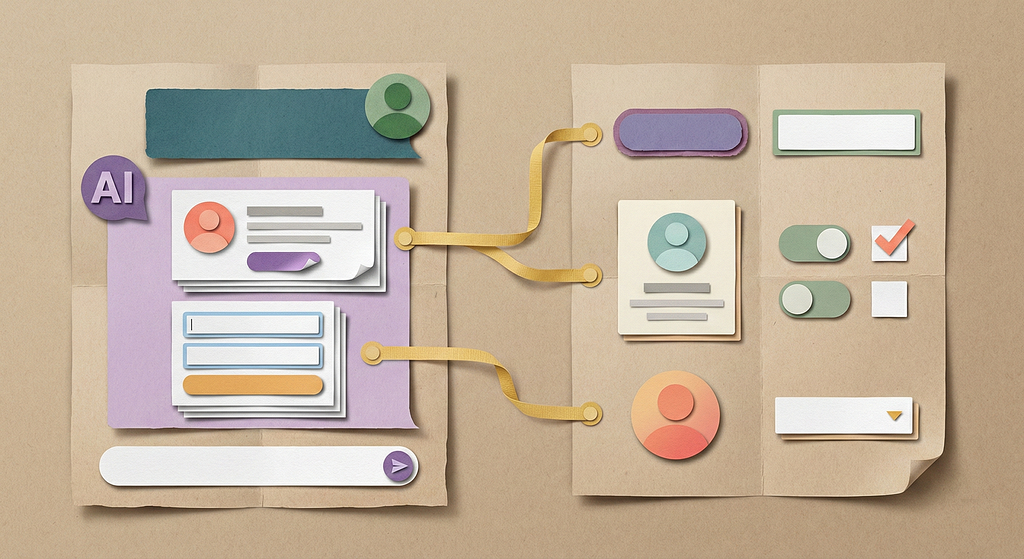
LLMs have made AI assistants a standard feature across SaaS. AI assistants allow users to instantly retrieve information and interact with a system through text-based prompts. Mathias Biilmann, in his article “Introducing AX: Why Agent Experience Matters,” discusses two distinct approaches to building AI assistants. The Closed Approach involves a conversational assistant embedded directly within a single SaaS product. Examples include Zoom’s AI Companion, Salesforce CRM’s Einstein, and Microsoft’s Copilot. The Open Approach involves external conversational assistants, such as Claude, ChatGPT, and Gemini, which are being supercharged via protocols like MCP (Model Context Protocol). This protocol allows the AI assistants to connect to and interact with various third-party SaaS products, effectively making a company’s product accessible to external assistants and agents.
The risk of commoditization
Both approaches are powerful. They offer users flexibility they’ve never had. However, they also reduce the carefully crafted user experience to a purely text-based interface. When the interaction is text-only and detached from your product, the user experience is no longer a differentiator, and your product is at risk of becoming a commodity.
Text-only interfaces also limit interactions to simple information retrieval and basic CRUD operations, making complex workflows difficult. This creates limitations as users attempt to consume large amounts of information and execute complex operations solely through text prompts. Andrej Karpathy, in his recent piece 2025 LLM Year in Review, noted that while text is the favored format for computers and LLMs, it is not for humans. We humans prefer information visually. Similarly, Maximillian Piras in 2024, argued that chat is often a poor fit for complex interaction patterns.
The temptation of generative UI
One answer gaining traction is generative UI where the AI autonomously creates interfaces based on the user’s prompts. While this capability is likely to improve significantly, it also presents a risk of delivering generic experiences. Without designer input, AI-generated UX defaults to the generic average of its training data. Every product starts looking the same. There is no differentiation. Dorian Tireli describes how AI is reinforcing mediocrity due to training data coming from common design platforms that are optimized for visual appeal.
The case for design system integration
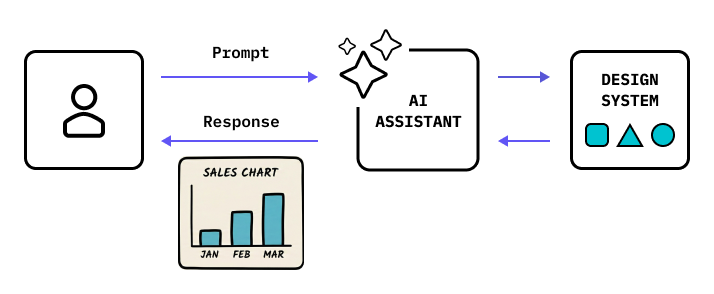
As a result, we need to examine an alternate approach, one where the AI assistants have knowledge of a product’s unique design system — its components, patterns, and guidelines. Any time the user prompts, instead of displaying text blocks and paragraphs, what if the assistant could render rich interfaces supplied by the product’s design system? This transforms the chat from a static text box into a dynamic viewport with rich interactive elements. The latest developments in the MCP protocol are making this approach possible.
Three modes for richer AI experiences
To create richer and differentiated experiences, I have considered three different design modes that can help us move beyond the text-trap.
Mode 1: Rich output
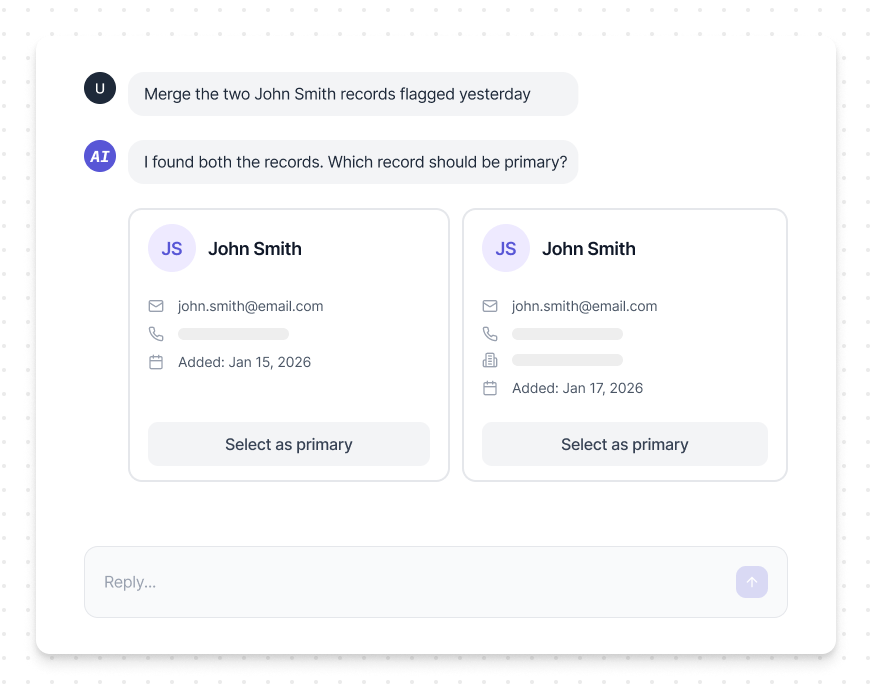
In complex business applications, users consume data, not just answers. Large blocks of text create cognitive load. The challenge is to move beyond text and towards a richer UI output. For example, when a user prompts “Merge the two John Smith records flagged yesterday,” the AI doesn’t ask “Which one should be primary?” Instead, it displays two contact cards side-by-side with metadata, enabling the user to make a decision through the UI. This approach maximizes scannability and allows the user to instantly grasp the situation and prioritize follow-up.
Mode 2: UI as input
The differentiated experience must start at the point of input, not just output. Rather than forcing users to craft precise text prompts and requiring them to know the exact parameters to provide, imagine if the AI assistant could replace the text box with a structured input component. For example, when a user wants to retrieve a record, instead of typing “Show me California leads with high activity” and then requiring the user to re-prompt every time they want to add more parameters, the AI assistant simply displays a query builder.
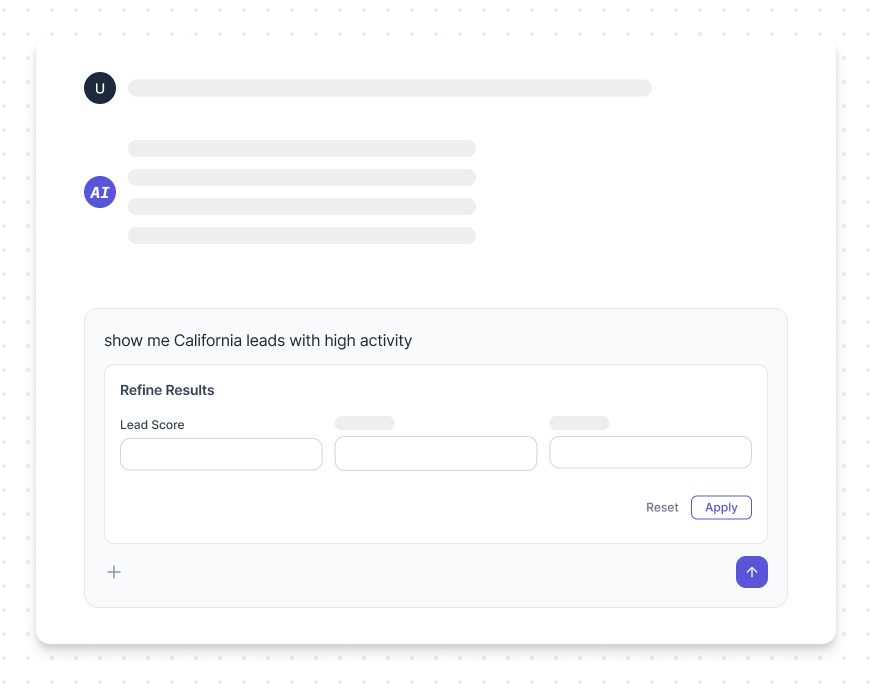
This shift from text to high-fidelity input removes ambiguity, reduces back-and-forth, and makes the overall interaction faster and more precise.
Mode 3: Co-creation
Modes 1 and 2 represent single interactions. But real-world scenarios are rarely this simple. In SaaS applications, high-value tasks are multi-step workflows. Creating a marketing automation campaign. Building a complex report. Configuring an integration. These aren’t things you accomplish in one prompt, rather they unfold over a conversation where the user and AI assistant refine the work together.
To support this, the AI assistant needs to become more than a responder. It needs to become a workspace.
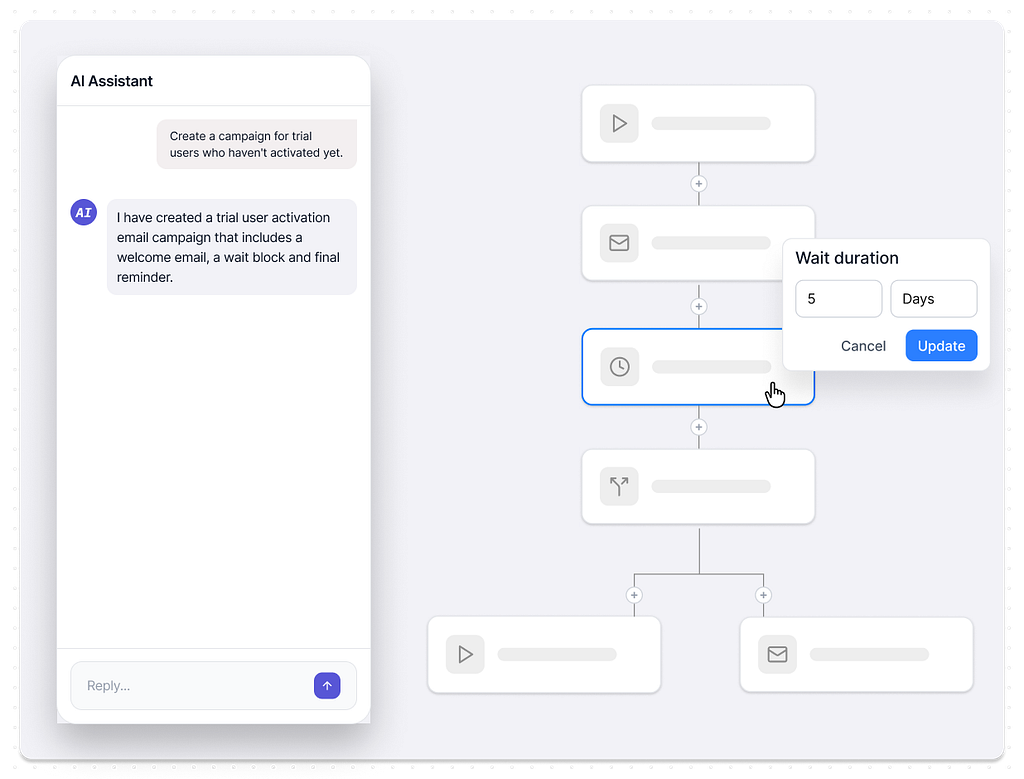
Let’s see how this plays out through a single scenario: a user creating a marketing automation campaign. The user prompts: “Create a campaign for trial users who haven’t activated yet.” The AI responds by rendering a flow builder component showing a draft campaign.

From here, four capabilities transform a back-and-forth conversation into a co-creation model.
Fluid modality switching
When the user wants to update a block, they shouldn’t be forced back to the text prompt. The AI assistant should allow users to move fluidly between text and direct manipulation. For example, rather than prompting “change the wait time to 5 days,” the user simply adjusts the wait component directly in the flow builder. The AI validates the change and updates dependent elements automatically.
Proactive cross-tool suggestions
Complex workflows often span multiple tools and users need information from various sources to take better decisions. Rather than forcing the user to start a new conversation or open a new tab, the AI assistant can bring data from connected tools directly into the workflow. Better yet, it can surface insights proactively.
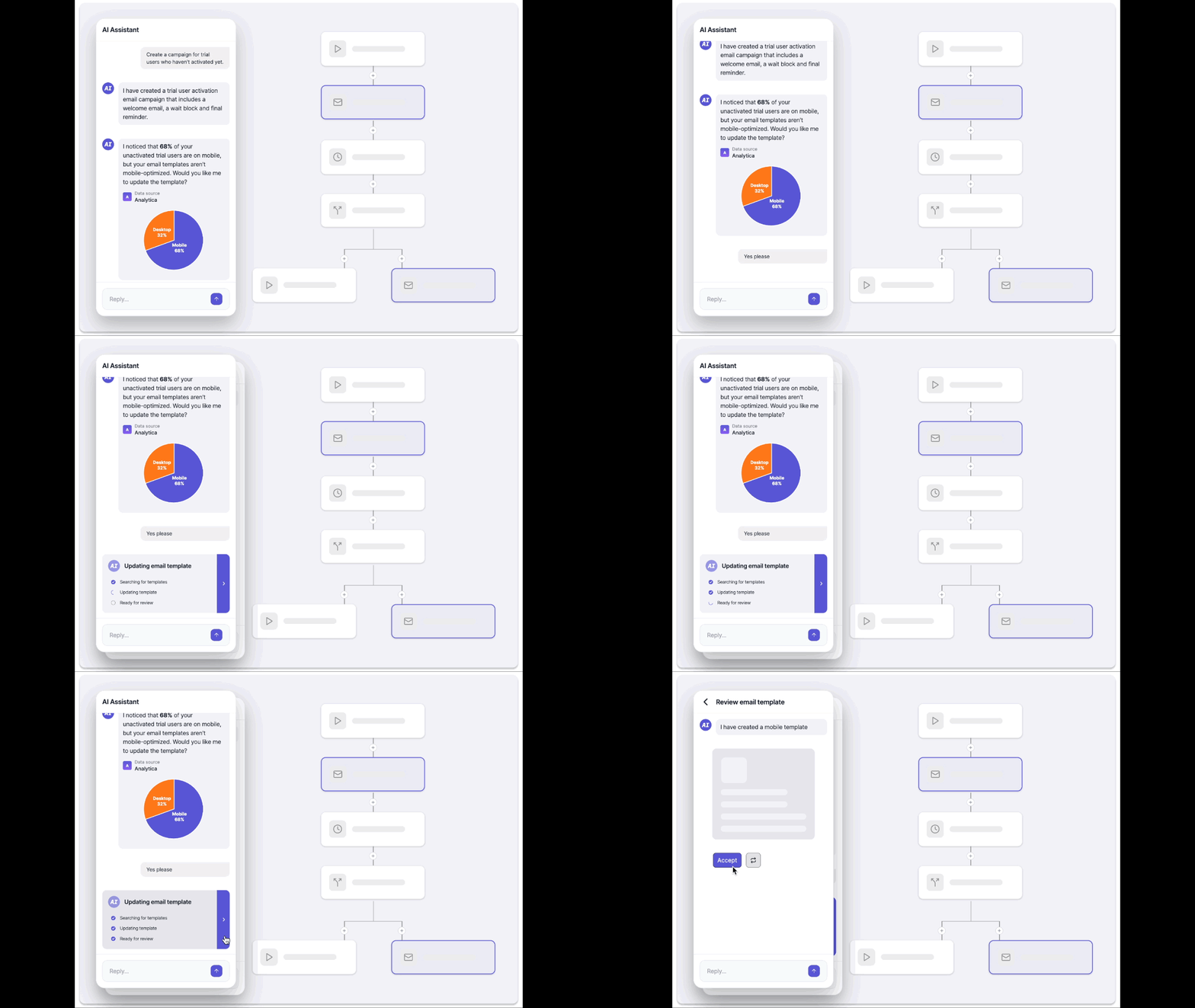
In our example, once the flow has been created, the AI notices that most unactivated users are on mobile, while the email templates are desktop-focused. Without being prompted, it pulls usage data from the connected analytics tool and surfaces a brief insight within the flow builder: “68% of your unactivated trial users are on mobile, but your email templates aren’t mobile-optimized.”

For this to work, the AI assistant needs the right level of access to the data. But access alone isn’t enough. The judgment layer needs to be designed to know when an insight is worth surfacing and when silence is the better choice.
Delegation of discrete subtasks
At some point in a multi-step workflow, the user may want to hand off a contained piece of work entirely. Based on the mobile optimization insight, the user prompts the AI assistant to update the template. The AI assistant then takes on the content work while the user continues refining the campaign’s structural logic. When ready, the AI surfaces the updated template for review. This is co-creation as division of labor, not just turn-taking.
Contextually refine with text
The text-based input doesn’t have to live in the prompt box — it can be contextual to the UI elements. For example, the user hovers over a connector in the flow and prompts, “Send a survey asking about their biggest challenge, then route them to different content tracks based on their answer.” In response, the AI inserts a new survey block before the final reminder email block, creates conditional branches based on common responses, and shows the multi-path workflow.
Because the prompt was anchored to a specific component rather than being in the generic prompt box, the AI understands where in the workflow the user is acting, not just what they’re saying. The library, Shape of AI by Emily Campbell highlights Inline action as way for user to adjust or respond to a small part of a larger piece of content.
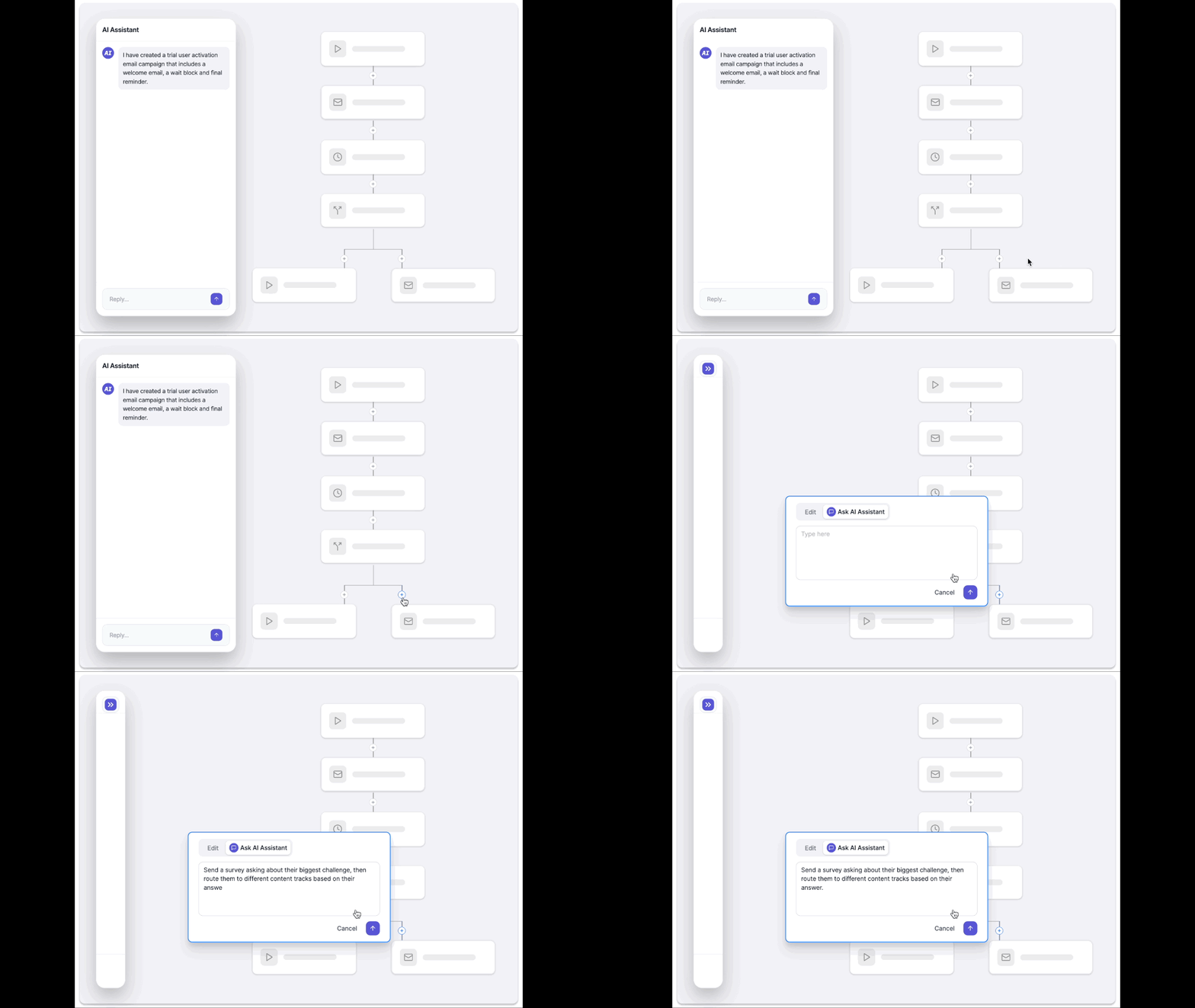
In Mode 3, rather than forcing users into turn-by-turn conversations, the AI assistant becomes an added modality for the product’s experience. It holds context across tools so the user doesn’t have to. It creates a shared workspace for co-creation so the user and AI assistant can work together.
The craft hasn’t changed
While designing for AI assistants and AI agents may sound daunting at first, the good news is that the skills required to succeed aren’t novel. They’re the same fundamentals that have always distinguished exceptional designers.
You need a deep understanding of users and jobs-to-be-done to identify which tasks actually benefit from conversational AI. Systems thinking is quickly becoming one of the most important skills as highlighted in these articles from Salesforce and Adobe. You need systems thinking, because these assistants cross boundaries, within your product’s IA and beyond it into other tools. And you need technical literacy: data models, APIs, backend logic. When users can query any data the system touches, you’d better understand what that data looks like.
AI assistants and agents are only going to keep increasing. The question isn’t whether your product will have one, it’s whether the experience will be differentiated or commoditized.
The text-trap is real, but it’s not inevitable.
AI’s text-trap: Moving towards a more interactive future was originally published in UX Collective on Medium, where people are continuing the conversation by highlighting and responding to this story.