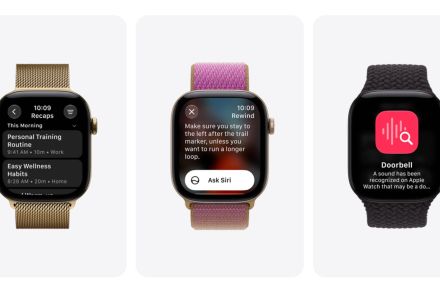
Your watch already tracks your steps, heartbeat, and even sleep. Apple now wants it to help you remember what people say (without tracking it), which is either brilliant or mildly unsettling, depending on how you feel about having microphones on your wrist or someone else’s.
Apple has started beta testing Live Rewind and Siri Recap, two new Audio Intelligence features for the Apple Watch Series 12 and Apple Watch Ultra 4. The features will arrive with iOS 27.3 beta, which is reaching developers first (starting today, November 3, 2026), while the public beta might follow in mid-December.
How do Live Rewind and Siri Recap work?
Live Rewind is the simpler one, and the one I’d try first. Double-press the Digital Crown on the watch, and it will show the last 15 seconds of speech as text. A chime and animation play even in silent mode, so nobody around the user is caught off guard.
You can then ask questions about the transcription or save it to the Siri app to review later. Per Apple, the transcription vanishes about 30 seconds after the display dims (via Apple Support).
Siri Recap is the bigger swing, though. Turn it on (optionally on a schedule), and it summarizes your conversations under a short title, with key details like dates, deadlines, and prices. Remember, Recap isn’t a transcript; it doesn’t mention who says what. It’s a summary.
You can review the recaps each day and save the important ones to Notes or Journal. Anything untouched deletes itself within seven days. Given that the features arrive in beta, I’d double-check what they mention with a careful eye.
Should an always-on watch microphone worry you?
Apple doesn’t expect that question, and in response, the company says neither feature creates or stores audio recordings. The S11 chip processes sound in a locked-down environment and then deletes it. So, apps, you, and even Apple can’t access the raw audio.
For a Siri Recap, condensed text made on your iPhone goes to Apple’s Private Cloud Compute for generating the summary, then it’s deleted immediately. What I like is that both features are opt-in. If you want, you can turn them off from the Control Center anytime.
Even so, a watch summarizing private conversations feels weird to me, and I’d tell the person across the table first. There’s also the risk of relying too heavily on the feature and taking conversations around you less seriously. That’s another legitimate concern.
You also need one of the latest Apple Watches to try it: a Series 12 or Ultra 4. Even those need to be paired with an iPhone 16 or later (not the 16e) with Apple Intelligence.
RELATED COVERAGE: