We may earn a commission from links on this page.
The Fitbit Air is a really nice wearable—it’s thin, unobtrusive, cheap. But its app, Google Health, has problems. It gives you paragraphs of AI-generated text multiple times a day as long as you have premium features turned on, and it’s missing simple things like the ability to see your stats from yesterday. Fortunately, the iPhone app Bevel is now compatible with Google Health, which means you can replace the app entirely.

What is Bevel?

Credit: Beth Skwarecki, Bevel
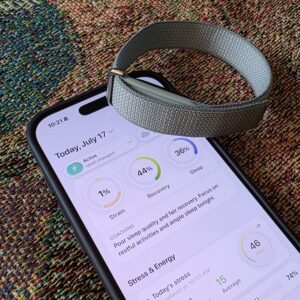
Bevel is an iOS app that reads health and fitness data from Apple Health, and back when it was subscription-only, I thought of it as an app that uses your Apple Watch to give you the kind of metrics you’d normally get from Whoop. But Bevel is free to use these days, with only a few add-on features behind a paywall. And it can pull data directly from Garmin, Oura, Strava, or now, Google Health. That means you can wear your Fitbit Air, ignore its native app (Google Health), and instead browse your health data and track your workouts through Bevel.
Unlike Google Health, Bevel has habit logging, a strength training feature that keeps track of what muscles you worked and whether you’re getting stronger, live activities for workouts, and food logging that includes barcode scanning, even on the free tier. Meanwhile, Google Health can only scan barcodes with a Premium subscription and AI turned on.
How to use Bevel with your Fitbit Air
To get the best of both worlds, you still need to have the Google Health app installed. Make sure it’s set up with your Fitbit Air as a connected device. If you have Premium or a Google AI subscription, you may want to turn off the Health Coach so you stop getting that constant commentary from the Coach. (You could turn off notifications entirely, but then you’d miss the ones letting you know your Fitbit Air is running low on battery.)
Next, install Bevel. To get Fitbit Air data, go to Settings and then Data Sources. Tap the plus button next to Integrations, and choose Google Health. This will let Bevel pull in data from Google Health, which gets it from Fitbit Air. If you use other devices, you can add them here, too.
What you get with Bevel

Credit: Beth Skwarecki
Here are a few things I like about using the Bevel app rather than Google Health:
-
You can see a previous day’s metrics by tapping on today’s date, and then choosing any date in the past—this is something Google Health is somehow still missing.
-
You can do strength workouts in the app. Bevel will give you a timer for the whole workout and for each set and rest; it will let you add exercises and log the weights and reps; and it will keep track of which muscles you’ve used recently. Google has none of that.
-
You can change your status to sick, injured, or “taking a break” if you don’t want to be nagged about keeping up your usual activity level.
-
Cardio load is presented in a way that’s much easier to understand, with a graph of your past history and recommended window, rather than Google’s single target.
-
Bevel’s “coaching” is limited to a few lines of text commenting on how your workout went or how you slept, unlike Google’s long and often hallucinatory paragraphs.
Bevel does offer a premium tier with AI coaching and an estimate of your “biological age,” which I haven’t tried. But overall, I find the free tier a much better way to view data from the Fitbit Air than either Google’s free or premium tiers. The integration between Bevel and Google Health is new as of this week, and I think it will be my preferred way to use the Fitbit Air going forward.