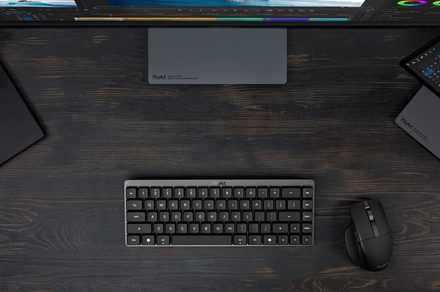
Creators have long had plenty of powerful laptops and monitors to choose from. Keyboards and mice? Not so much. ASUS is looking to change that with the expansion of its ProArt accessory lineup. Leading the announcement is the new ProArt Keyboard KD300, a compact low-profile keyboard that’s designed to work alongside the ProArt Mouse MD301, giving creators a matching desktop setup built specifically for productivity instead of gaming.
A compact keyboard that doesn’t sacrifice functionality
The ProArt Keyboard KD300 adopts a 65% layout, making it considerably smaller than a traditional full-size keyboard while still retaining the essential navigation keys most creators use every day. ASUS has opted for ASUS RX Red low-profile optical switches, aiming to deliver a fast, responsive, and smooth linear keystroke feel in a slimmer, quieter design that’s more comfortable during long editing sessions.
ASUS has also added several productivity-focused touches, including tri-mode wireless connectivity, allowing users to switch between multiple computers or tablets with support for pairing up to five devices simultaneously. The keyboard also features customizable keys, an innovative touch panel, and creator-centric shortcuts that integrate with ASUS’ new web-based Gear Link interface, enabling quick configuration of profiles, key mappings, and macros across creative applications.
The ProArt mouse is built for creators, too
Joining the keyboard is the ProArt Mouse MD301, an ergonomic wireless mouse designed with photo editors, video creators, and designers in mind. It features an 8,000 DPI optical tracking sensor that works even on glass, dual scroll wheels (including a side wheel) for navigating large timelines and spreadsheets, six programmable buttons, and tri-mode connectivity. Hot on productivity, ASUS includes its SmartShift scroll wheel, which automatically switches between precise line-by-line scrolling and a faster free-spin mode depending on how quickly the wheel is flicked.
One particularly interesting feature is the hot-swappable main buttons, allowing users to replace worn-out left and right click switches to extend the lifespan of the mouse or customize click feel using standard Push-Fit sockets. ASUS claims the MD301 can deliver up to 180 days of battery life on a full charge, while a quick one-minute USB-C charge provides roughly eight hours of light use, making it well suited for professionals who spend all day at their desks.
Rather than chasing RGB lighting configurations or ultra-high gaming polling rates, ASUS is clearly targeting a different audience here. The KD300 and MD301 are designed around long work sessions, compact desks, and creative workflows where comfort and efficiency matter more than esports credentials.