Ravie LakshmananJul 10, 2026Enterprise Security / Authentication

A threat actor has been targeting organizations spanning multiple sectors with voice-based fake security requests that prompt Microsoft 365 users to enroll a new Entra passkey with an aim to carry out data extortion attacks.
The threat actor, tracked by Okta under the moniker O-UNC-066, has deployed a panel-controlled phishing kit that’s capable of targeting the passkey enrollment process. The activity has singled out food and beverage, technology, healthcare, automotive, construction, and aviation industries.
“The threat actor registers domains that incorporate the word passkey as part of a voice-enabled phishing (‘vishing’) scheme,” Okta researcher Houssem Eddine Bordjiba said. “The threat actor then calls targeted users on the phone in an attempt to persuade them that they need to register a new passkey.”
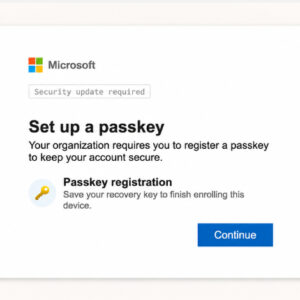
Users are then directed to a phishing kit that’s identical to the Microsoft passkey enrollment process, giving the impression that they are adding a passkey with Microsoft, when, in reality, the threat actor registers their own passkey against their Microsoft account, granting them unauthorized access.

The development coincides with Microsoft allowing administrators to configure registration campaigns to nudge users to register passkeys during sign-in in an attempt to help organizations drive passkey adoption at scale. In other words, threat actors are abusing the phishing-resistant security upgrade process as a lure to enroll their own passkeys within victims’ accounts and facilitate follow-on activities.
Unlike adversary-in-the-middle (AitM) landing pages that are prevalent in phishing campaigns designed to steal credentials and multi-factor authentication (MFA) tokens, the phishing kit used in these attacks is an operator-controlled PHP panel in which a victim is guided through the passkey enrollment process in almost real-time.
“The operator can use the kit to adapt the user experience to each victim’s MFA requirements (TOTP, push notification with number matching, SMS OTP) during the session,” the identity security company said. “The caller can control and adjust in real time what phishing pages and notifications a targeted user sees.”
It’s suspected that the threat actor is leveraging the kit to take over the victim account and trick the user into approving an attacker-initiated registration of a passkey. There is no indication at this stage to suggest that the kit is redirecting users to third-party identity providers like Okta.
The entire sequence of actions is below –
- The first page of the phishing kit (/gate) displays a page loading icon while the phishing kit performs anti-analysis checks in the background.
- The second page (/identify) requests a username.
- The next page (/password) challenges the user for a password.
- The harvested credentials are sent in a POST request to an operator panel at “/backend.php.”
- The phishing kit operator (likely different from the individual calling the victim) enters the stolen credentials on the legitimate Microsoft sign-in page for the targeted tenant.
- The victim sees a “/processing” page that serves another loading screen as it awaits the operator’s instruction based on the observed MFA challenges presented to them in the legitimate flow.
- The next page of the phishing kit is presented to the user: “/submit-otp” for an SMS-based one-time password (OTP) challenge, “/submit-authenticator” for time-based OTP challenge, or “/approve-authenticator” for a push MFA challenge.
- The captured OTP is sent in a POST request to “/backend.php.”
At this point, the victim has been deceived over the phone into approving the attacker’s access to their Microsoft 365 account. The attack chain then initiates another set of actions focused around the passkey pretext –
- The victim is redirected to the “/passkey/register” page, which instructs the user to create a passkey.
- The Microsoft-branded “/passkey” page prompts the user to save their recovery key for confirming their passkey.
- The “/passkey/check” page asks the user to verify the final word used in the seed phrase.
- The “/done” page confirms that a passkey registration was successful.

The recovery key contains a series of 12 words that’s similar to secret recovery phrase or mnemonic phrase typically associated with cryptocurrency wallets. The step is assessed to be a distraction mechanism to keep the victim occupied with the task, while they enrolled their own passkey in the Microsoft account.
“The phishing kit appears to prey on lack of user familiarity with passkey authentication,” Okta explained. “In a real passkey registration ceremony, the user might expect a system dialog to register a passkey on their device. The passkey pages in this phishing kit appear to mimic this process without registering a passkey.”
Okta noted that a threat actor linked to O-UNC-066 has been operating a data leak site since April 2026 under the name Pink. Palo Alto Networks Unit 42 is tracking this cluster as CL-CRI-1147, describing it as affiliated with a decentralized cybercrime collective known as The Com, of which Scattered Spider, ShinyHunters, and LAPSUS$ are part of.