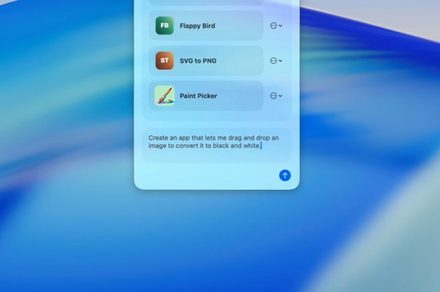
Ironsmith is a free AI Mac app builder for Mac users with a narrow problem and no patience for the usual developer workflow.
The open source menu bar app, shared by developer Jade Westover, turns plain-language requests into native macOS tools. Its target is the quick desktop helper, the kind of utility built around one personal task that would be hard to find in the App Store.
It can use on-device models or cloud LLMs, so users aren’t boxed into one provider or one style of AI setup. Ironsmith is still in beta, so it’s better suited to low-risk experiments than sensitive or essential work.
How does a prompt become an app
Ironsmith turns a request into a lightweight Swift package behind the scenes, then builds it into a native Mac tool. Westover says users don’t need full Xcode installed, only Apple’s command line tools.
Instead of exposing a pile of generated code, Ironsmith wraps the build process inside a Mac menu bar app. After the prompt stage, it handles the structure of the tool and produces something that can run as a native utility. That keeps the experience closer to making a small Mac helper than managing a software project. Users still need Apple’s command line tools installed, so setup hasn’t disappeared completely. The lighter path is the draw, especially for people who want a one-purpose app without opening the heavier developer stack.
A generated app can be a helper for a recurring desktop task, a one-purpose utility, or another small tool that’s too specific for a broad app store release.
Why choose local or cloud models
Model choice gives Ironsmith practical flexibility. Users can generate tools with local models or hosted services, which creates room to balance speed, convenience, and reliance on cloud AI.

The local option fits the personal utility angle especially well. When the goal is building small tools for private workflows, keeping some of that process on the Mac gives users a cleaner way to experiment without defaulting to remote services.
What should users check first
Generated apps are sandboxed by default, and extra permissions still need user approval. That’s the right baseline for software created on demand, but users still need to inspect what each tool asks to access.
For now, Ironsmith is best treated as a beta playground for small Mac jobs. Start with low-risk tasks, check permissions carefully, and watch whether future builds make generated tools stable enough for everyday use.