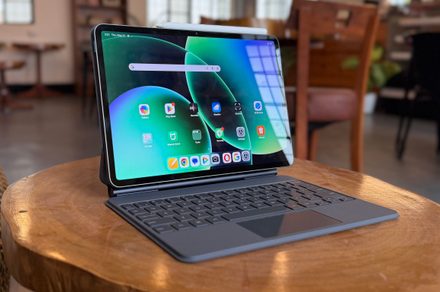

“Android’s best stab at the iPad’s crown.”
- Terrific tablet performance
- Surprisingly good thermals
- Reliable battery mileage
- Clean metallic build
- Pixel-dense 144Hz screen
- Fantastic keyboard case
- OLED panel is a key miss
- Workstation mode needs work
- Camera bump is unsightly
- Not officially sold in the US
- HyperOS carries bloat weight
- Computing kit is expensive
For years, I’ve kept a default disclaimer ready whenever I am asked to recommend Android tablets. “It’s good/meh, for an Android tablet.” That little clarity did a lot of heavy lifting. It excused the issues with laggy apps stretched haphazardly across an oversized screen, the ho-hum firepower, and software that always felt like a phone wearing a costume two sizes too big. So when the Xiaomi Pad 8 Pro landed on my desk, I had my disclaimer loaded and ready to unload indiscriminately.
I’ll save you the suspense and tell you it never came out. This slate is a genuine powerhouse, the kind of tablet that goes after the iPad Air and the Galaxy Tab S-series without flinching, and then upturns the value debate with its attractive asking price. It runs Qualcomm’s top-tier Snapdragon 8 Elite, which means it can chew through all kinds of mobile tasks with ease.
The machine is wrapped in an aluminum shell that feels every bit as flagship as the price tag refuses to be. It has decent speakers, a pixel-dense but buttery-smooth screen, and a few additional tricks of its own. There’s a catch, and we’ll get to it, because there’s always a catch. But for the first time in a long while, I’m reviewing an Android tablet without that apologetic asterisk hanging over every sentence.
Quick Review

The Xiaomi Pad 8 Pro is, plainly, an absurd amount of tablet for the sticker price, which falls around $600, depending on where you import it from. The Snapdragon 8 Elite inside it delivers laptop-grade speed, and its 11.2-inch 3.2K 144Hz display is excellent enough that I kept forgetting it wasn’t the most expensive screen in the room. The 9,200mAh battery is a monster that simply lasts long, easily stretching past 15-16 hours on a single charge, and the whole thing is built like a premium slab that punches well above its weight class.
So, what about the catch I promised? Well, the screen is an LCD panel, not an OLED. There’s a silver lining, though, in that there’s no PWM flickering to torment sensitive eyes, but you don’t get the inky blacks that Samsung’s OLED panels serve up. Additionally, while HyperOS 3 has matured into something genuinely impressive, complete with a proper desktop-like app multi-tasking mode and cross-platform tricks that try their best to break Apple’s walled garden.
Yes, Android’s tablet app ecosystem still occasionally trips over its own feet when it comes to scaling. But none of that changes the final outcome. If you want raw, unfiltered performance and terrific battery life without nuking your wallet for an iPad Pro, the Xiaomi Pad 8 Pro is one of the best value-for-money tablets you can buy right now, Android or otherwise. Just be ready to cough up extra cash if that lovely cantilever keyboard has caught your fancy.
Xiaomi Pad 8 Pro specs: What’s inside this sleek slate?
| Colors | Pine Green, Blue, Gray | |
| Dimensions | 251.22mm x 173.42mm x 5.75mm (Standard) / 5.8mm (Matte glass version) | |
| Weight | 485g (Standard) / 494g (Matte glass version) | |
| Display | 11.2-inch, 3:2 ratio, 3.2K (3200 x 2136 pixels, 345 ppi) | |
| Refresh & Touch Rate | Up to 144Hz refresh rate / Up to 360Hz touch sampling rate (240Hz with pen) | |
| Display Features | 800 nits peak brightness, 68 billion colors, HDR10, Dolby Vision, DCI-P3, TÜV Rheinland Certified (Low Blue Light, Flicker Free, Circadian Friendly) | |
| Processor | Qualcomm Snapdragon 8 Elite Mobile Platform (3nm, 8-core CPU: 2×4.32GHz + 6×3.53GHz) | |
| GPU | Adreno 830 @1100MHz | |
| RAM & Storage Options | Standard: 8GB+128GB, 8GB+256GB, 12GB+512GB | Matte glass version: 12GB+512GB |
| Memory | RAM: 8GB (LPDDR5X) / 12GB (LPDDR5T) Storage: 128GB (UFS 3.1) / 256GB & 512GB (UFS 4.1) |
|
| Rear Camera | 50MP, f/1.8 PDAF, up to 4K video at 60fps | |
| Front Camera | 32MP, f/2.2, up to 1080P video at 30fps | |
| Battery & Charging | 9200mAh (typ), 67W HyperCharge, USB Type-C | |
| Security | Side fingerprint sensor, AI face unlock | |
| Data Transfer | USB 3.2 Gen 1 (Up to 5Gbps) | |
| Connectivity | Wi-Fi 7 capability, IPv6, 2×2 MIMO, Miracast | |
| Audio | Immersive quad speakers, Hi-Res & Hi-Res Wireless Audio, Dolby Atmos, AAC / LDAC / LHDC 5.0 / LC3 / Auracast | |
| Video Playback | Supports MP4, MKV, WEBM, 3GP, Netflix HDR10, Dolby Vision | |
| Sensors | Accelerometer, Gyroscope, Ambient light (Front & Rear), Flicker, Hall, Side fingerprint, Magnetic, Proximity, RGB LED, IR remote control | |
| Operating System | Xiaomi HyperOS 3 | |
| Package Contents | Tablet Computer, Adapter, USB Type-C Cable, Quick Start Guide, Warranty Card |
Xiaomi Pad 8 Pro design and build: Sleek, industrial, and that’s all

I can’t resist the charms of a gadget that costs less, but still oozes flagship charisma. The moment I picked up the Pad 8 Pro, it played directly to that weakness. The first impression is stark, minimalist, and unmistakably premium. Xiaomi has very obviously been taking notes in Apple’s design class, and you know what? It clearly paid attention.
The aluminum unibody is rigid to the point of stubbornness. I tried to force some flex out of it, the way you instinctively do with any new slab or a laptop lid, and got absolutely nothing for my effort. At 5.75mm to 5.8mm thick, ignoring the camera bump, it’s the kind of thin that makes you slightly nervous and deeply impressed at the same time. It’s a fraction chunkier than a Galaxy Tab S11, but thin enough that it disappears into a bag without a fight.

At 485 grams, Xiaomi has shaved 15 grams off the last generation, and the weight lands squarely in the Goldilocks zone for an 11-inch tablet. There’s enough heft to feel expensive in the hand, but it’s light enough that I held it one-handed through a long article and a longer sketching session without my wrist filing a complaint.
The rear panel wears a matte metallic finish that shrugs off fingerprints and smudges, so it stays pristine even after I’ve been pawing at it all day. It comes in grown-up, understated shades like Gray, Black, Pine Green, and Light Blue. The flat edges give you a confident grip, and the symmetrical bezels hugging the display are uniform enough to look genuinely modern, working out to an 86% screen-to-body ratio that keeps your eyes on the screen and not the frame.

Living with the hardware is intuitive in the way good hardware should be. The power button sits on the top left edge in landscape, and it hides a fingerprint scanner that’s pretty fast. A single tap and I’m in, every time, which beats the 2D facial recognition the front camera also offers, and which I trust about as far as I can throw it. The volume rocker is parked on the top edge, easy to reach in either orientation.
Connectivity comes by way of a USB-C port that meets the USB 3.2 standard, and that detail matters more than it sounds. You get 5Gbps data transfers, which turns moving giant video files or photo libraries from a coffee break into a non-event, and it’ll push video out to an external monitor with the right adapter. For a tablet at this price, that’s the sort of thing that usually gets quietly cut.

If there’s one design decision that’ll split a room, it’s the rear camera module. There’s a 50MP sensor in there, housed in a square bump that is, frankly, larger and prouder than a tablet really needs. It doesn’t ruin the clean look, but it does introduce a little wobble when the tablet’s lying flat on a desk without a case. A minor sin, but a noticeable one, I’d say!
To actually earn the “Pro” in the name, Xiaomi sells two accessories that are critical and, of course, not cheap. The Focus Keyboard Pro is what nudges the tablet into 2-in-1 territory. It uses a floating hinge design that owes an obvious debt to Apple’s Magic Keyboard, pairs it with a surprisingly responsive plastic trackpad, and gives you chiclet keys with genuinely good travel.

Best of all, the backlight runs off the tablet itself through pogo pins, so there’s no Bluetooth pairing dance to suffer through. The catch, and there’s that word again, is that the hinge doesn’t tilt very far, and the heavy base makes the whole setup top-heavy. On a solid desk, it’s fantastic. On your lap or a soft bed, it has an alarming tendency to tip over backward like it’s fainting.
The Focus Pen Pro weighs a featherlight 18 grams and ditches physical buttons entirely, leaning on pressure-sensitive areas and squeeze gestures instead, so you can squeeze to grab a screenshot or open a canvas. It snaps magnetically to the top of the tablet to charge, offers over 16,000 levels of pressure sensitivity with an extremely low latency, and adds haptic feedback that makes writing and drawing feel weirdly, satisfyingly tactile. I’m no artist, but I found myself doodling far longer than I needed to, which is the highest praise I can give a stylus.

Build score: 8/10
Xiaomi Pad 8 Pro display and sound: Runs a mile till you lean in
The screen and speakers on the Pad 8 Pro are a story of soaring highs, with one specific footnote that anyone planning to use this as a home cinema needs to read carefully. Let’s deal with the elephant in the room first, because it’s wearing a backlight. The 11.2-inch screen is an IPS LCD panel, not an OLED. You should expect one at this asking price, but the iPad Air still sells like hotcakes with an LCD panel, so it seems budget-conscious buyers don’t seem to obsess over it.
In a world where the Galaxy Tab S11 and the Honor MagicPad 4 are flexing gorgeous OLED panels, sticking with LCD reads, on paper, is like a step backward. And since it leans on a single universal backlight rather than millions of individually lit pixels, you’ll catch a faint backlight glow in the black bars during a widescreen 16:9 movie in a dark room. The contrast is decent on this LCD panel, but it simply can’t conjure the perfect black that an OLED does without trying.

Here’s the silver lining, though. If this is an LCD, it might be the best LCD anyone’s ever bolted into a tablet. The resolution is a stunning 3.2K (3200 x 2136), which works out to a 345 ppi pixel density. That’s noticeably sharper than the iPad Air 11’s 265 ppi, and it shows. Text renders with a crispness that makes reading, browsing, and document editing feel effortless.
The 3:2 aspect ratio is the unsung hero here, giving you more vertical room and making the whole thing far better for getting actual work done than the cramped 16:10 screens you find elsewhere. The 144Hz refresh rate is hard to walk back from once you’ve felt it, and paired with a high touch sampling rate, scrolling and swiping all feel instant and liquid-smooth.

The brightness is no slouch either. It sits around 626 nits in everyday use and climbs close to 800 nits when you feed it HDR content. Colors are punchy, and Xiaomi gives you proper white-balance tuning buried in the settings if you like to fiddle with the visual output. And then there’s another understated perk. There’s no PWM flickering at low brightness, none at all.
If OLED screens give you eye strain or headaches at night, and plenty of people genuinely suffer from this, the Xiaomi Pad 8 Pro is a flicker-free oasis. There’s even a pricier matte glass anti-glare edition if reflections are your particular nemesis. That’s a thoughtful touch, and it reframes the whole LCD decision from compromise to deliberate choice for a specific kind of person.

To go with that smooth screen, Xiaomi has fitted a quad-speaker array, two on each side in landscape orientation, tuned by Dolby. For a chassis this thin, the sound that comes out of this slate is genuinely surprising. It comfortably fills a small room without much effort. The highs and mids get a touch wavy at the very top of the volume range, but the bass has decent depth, enough to rival a small dedicated Bluetooth speaker. Whether I was blasting a Spotify playlist or leaning on it for a Zoom call, the audio came out rich, spacious, and far more immersive than most mid-tier tablets can manage.
Multimedia Score: 8/10
Xiaomi Pad 8 Pro performance: A smooth performer that maintains its cool
If you want to see exactly where your money went on the Xiaomi Pad 8 Pro, pop the metaphorical hood. This slate is an economical monster, and the engine is Qualcomm’s 3nm Snapdragon 8 Elite. The Qualcomm silicon, with its Oryon cores clocked as high as 4.32GHz and an Adreno 830 GPU riding alongside, doesn’t politely edge past the Android tablet competition.

This slate runs off the road. In Geekbench 6, it posts single-core scores north of 3,000 and multi-core scores that consistently go past the 9,000 ballpark, which comfortably beats anything running a MediaTek Dimensity 9400 and lets it trade blows with Apple’s M-series silicon. In AnTuTu v10, it punches through to a frankly silly range of 2.5 million points.
It also delivered an impressive stress stability score of over 90% on 3DMark tests, and dropped to 81% (only once) before it stabilized on an intensive throttle test lasting well over half an hour. In simpler terms, the tablet will maintain peak performance under sustained load for longer spells of work, or play/
But benchmarks are only ever half the story, and the duller half at that. In real-world use, this tablet flies. With up to 12GB of fast LPDDR5T RAM and UFS 4.1 storage on the 256GB and 512GB models, apps simply don’t have load times worth mentioning. For anyone doing creative work, those UFS 4.1 read/write speeds mean heavy files move in a heartbeat.

I exported a few dozen RAW DNG files to JPEG in Adobe Lightroom in just over 30 seconds, and rendering a complex 10-minute timeline in CapCut took roughly five minutes. That’s not “good for a tablet” muscle. That’s genuine, desktop-grade creative power. Of course, my edits were nowhere near as dense or heavy on color-grading as the work of Dennis Villeneuve, but they still had enough touch-ups to stand out on social media.
For gaming, the Xiaomi Pad 8 Pro is a dreamy machine, and I am not exaggerating. Genshin Impact runs at a smooth 60fps on the highest settings, and shooter games fare no different. I spent maximum time playing Zenless Zone Zero and The Division Resurgence at the peak graphics settings, and had a lovely time. What impressed me even more than the peak performance, though, was the way it handles heat.

Tablets have far more surface area to bleed heat into than phones do, and Xiaomi exploits every square millimeter of it. In the scorching heat of Delhi, where the temperatures are constantly hovering above the 109-degree Fahrenheit mark, the Xiaomi tablet only warmed up a bit, but never got toasty, even after marathon gaming sessions. I’ve had tablets heat like an oven at these games, but the Xiaomi Pad 8 Pro proved to be a champion at heat dissipation.
Performance Score: 9/10
Xiaomi Pad 8 Pro software: Snappy and mold-breaking with some bloat

The Xiaomi Pad 8 Pro runs Android 16 with Xiaomi’s freshly brewed HyperOS 3 painted over the top. Android tablets have spent years failing to match the polish of iPadOS, and I’ve made peace with that fact more times than I’d like to admit. But HyperOS 3 closes that gap to a degree I genuinely wasn’t expecting, leaning hard into multitasking, looks, and cross-platform tricks en masse.
Visually, HyperOS 3 is clean, modern, and deeply customizable. Xiaomi has smoothed out the system animations so the whole UI feels fluid and organic rather than twitchy. The lock screen does iOS-style depth effects and widget customization, and the home screen carries a persistent macOS-style dock at the bottom for quick jumps to your favorite and recent apps. It’s the kind of borrowing that’s hard to be cynical about when the result just works this nicely.

Multitasking is where HyperOS 3 genuinely earns its keep. It handles split-screen views natively, including a new 1:9 horizontal split, plus floating pop-up windows. But the real party trick for power users is Workstation Mode. Flip it on from the control center and the UI morphs into a Windows-like desktop, with apps opening in free-floating, resizable windows instead of swallowing the whole screen. And yes, it’s somewhat inspired by Apple’s Manager.
It’s one of the best Android desktop implementations I’ve used.
But it isn’t flawless. App scaling can still be inconsistent, and some mobile-optimized websites have a small meltdown when you squeeze them into an odd window size. It’s brilliant for writing emails while peeking at a PDF, but it’s not about to fully replace a Windows or Mac laptop for complicated, multi-windowed workflows. Close, though. Closer than I’d have believed.

Then there’s HyperConnect, which is Xiaomi taking a sledgehammer to its own walled garden. You can share clipboards, files, screens, and even Wi-Fi passwords not just with other Xiaomi gear, but with iPhones, iPads, and Windows PCs. As someone who lives in a chaotic mixed-ecosystem household, this kind of interoperability isn’t a gimmick. It’s a daily quality-of-life upgrade. There’s a learning curve, but it’s a great start.
On the AI side, the tablet is stuffed to the gills. Google’s Gemini assistant is baked right in, sitting alongside Xiaomi’s own “HyperAI” suite that can handle real-time transcription, live video subtitles, AI writing assistance, and image editing tools like AI Eraser and AI Expand, which uses generative fill to stretch your photo borders. The generative edits can look a touch pixelated if you go pixel-peeping, but for social media, they do the job perfectly well.
Software score: 8/10
Xiaomi Pad 8 Pro battery life & charging: A reliable warhorse

When you cram a massive screen and a power-hungry top-shelf processor into one device, the natural worry is that the battery will be gasping for breath by lunchtime. Xiaomi has answered that worry with a 9,200mAh battery, and it tangibly calms down the mileage grievances.
The endurance here is, frankly, spectacular. In testing, the tablet pushed past 17 hours of continuous Wi-Fi browsing with the brightness levels hovering close to the 50% mark, and held on for over 15 hours of sustained full-HD video watching — significantly better than the 11-inch iPad Air in my tests.
In day-to-day life, that translates to a multi-day battery mileage. I wrote for hours on it using Docs, followed that with an evening of Netflix, and still had enough left for a quick call, or two, on the next morning. The idle drain is so low that I left it on the coffee table for a few days and came back to find it still powered on without a horrific power drain. That’s the kind of trust you usually only extend to an iPad.

When you finally do need to plug in, the Xiaomi Pad 8 Pro takes 67W wired charging. Thankfully, the adapter comes bundled in the box. That’ll take the enormous battery from flat to 50% in 32 minutes, with a full 0-100% landing in around 78 minutes. Given how much battery there is to fill, those are genuinely convenient top-up speeds. One minor disappointment is the lack of wireless charging, though that’s a near-universal omission on tablets thanks to the headache of lining up charging coils on a big aluminum slab. Apple doesn’t offer that convenience, nor does Samsung or any other Android player, so the absence doesn’t even pinch.
Battery: 9/10
Should you buy it
If you’re a power user on a budget, this is your tablet, full stop. You get Snapdragon 8 Elite’s firepower for heavy gaming, emulation, or video rendering without having to stomach the eye-watering prices of an iPad Pro or a Galaxy Tab S-series Ultra. It’s also the travel companion that outlasts the trip, with up to 18 hours of active use and quick 67W charging when you finally deplete the battery bank.
If you’re one of the people OLED screens actively punish with headaches, the bright, flicker-free 144Hz LCD is a small miracle that reframes its biggest “weakness” into the very reason you’d choose it. Throw the Focus Keyboard Pro into the mix, let Workstation mode loose, and you’ve even got a surprisingly capable lightweight laptop stand-in for writing and web-based work.

There are people it’s not for, though, and I’d be doing you a disservice to pretend otherwise. If you’re a cinephile whose nights are spent watching HDR movies in the dark, the backlight glow and the absence of true blacks will nag at you in a way they simply won’t for everyone else. The only respite? Get a tablet with an OLED screen. If you need a flawless desktop replacement, Workstation mode is great, but Android’s app ecosystem still lacks the scaling polish and the deep professional software bench you’ll find on Windows, macOS, or even iPadOS.
And if you hate the hassle of importing electronics, know that buying outside officially supported regions means wrestling with Chinese ROMs, side-loading Google services, and crossing your fingers on the warranty situation. For everyone else, this might just be the best performance-to-price ratio in the entire tablet market right now.
Why not try
OnePlus Pad 3 — If you love everything about Xiaomi’s value pitch but want a tablet you can grab from a US retailer with a proper local warranty, the OnePlus Pad series is the answer. It offers a productivity-friendly 7:5 LCD screen and top-tier Snapdragon silicon. You get a similarly premium aluminum build, excellent battery, and very fast charging. The trade-off is that OxygenOS doesn’t have quite as robust a desktop windowing mode as Xiaomi’s Workstation or Samsung’s DeX, and the keyboard-and-pen ecosystem is a tad less refined than the competition’s.
How we tested
I used the Xiaomi Pad 8 Pro for a spell of nearly two months, and in that duration, it served as a secondary computing machine for me alongside my Mac. On numerous occasions, I also pushed it as my standalone work device, using it to write articles and handle WordPress duties, alongside workplace productivity apps such as Asana and Trello, and a bunch of communication apps, which include Microsoft Teams and Slack.
As far as performance testing goes, I played a variety of games on the Xiaomi tablet, pushing it at demanding titles such as Zenless Zone Zero and Diablo Immortal. For multimedia, usage apart from the usual set of streaming apps, I also extensively used Canva and LumaFusion on the tablet. For software-related work, I extensively pushed Claude on the Xiaomi Pad 8 Pro to develop some simple utilities, such as Chrome extensions and brainstorm Mac app development ideas.
I use the tablet alongside the Xiaomi Pad 8 Pro Focus keyboard and the Focus Pen Pro. The tablet was always connected to a stable Wi-Fi network, and while on the go, it was linked up through a 5G mobile hotspot via my phone.