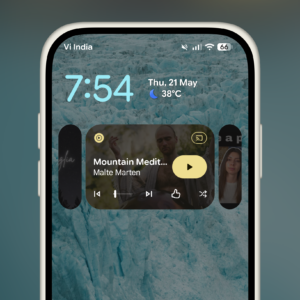
If you’re like me, you’re probably juggling multiple audio apps throughout the day. I listen to audiobooks on Audible, switch over to music on Spotify, check out podcasts on Pocketcasts, and there’s always something on YouTube in the background. Usually, switching between audio sources means opening the app, finding the playback function (or the media itself), and pressing play, every time you want to listen to something new. With Android 17 (currently in beta), Google is giving us a more advanced version that lets you easily switch between playback sources right from the Notifications panel. The new Now Playing media switcher is rolling out to Android 17 QPR Beta 3 users across the globe, and should be a part of the stable release in a couple of months.
Media switching on Android works better as tiles

Credit: Khamosh Pathak
Now, technically speaking, this isn’t a whole new feature: It’s an update to one that no one really used. In Android 16, you can swipe on the Now Playing panel in the Notifications shade to access previously used apps and media. But this gesture is often buggy, and you’ll often end up swiping on the media scrubber itself. There’s also no clear indication that you can switch between playback sources in the panel.
The new design in Android 17 fixes all of this, and makes it a feature I can actually see myself using every day. When you’ve used multiple media apps recently, you’ll now see two tiles next to the Now Playing bar in the Notification shade. Tap on a tile, and it shows the source, with the title, background image, and your last listening position. From here, you can tap the big Play button to switch to the source. Swiping between the tiles works as well. And this also works on the lock screen, so you can switch between audio sources without even unlocking your smartphone.
You’ll only see up to two other tiles at the same time, but the feature works with up to four recent audio sources. You’ll just have to swipe across to see the fourth in the Now Playing bar. There is a downside, though. When you have two other sources, the playback tile itself shrinks down, and you lose out on the horizontal space. YouTube titles, especially, are brutally cut off. But in my time using the switcher, I didn’t find that particularly annoying. The extra functionality outweighs the reduced readability. Plus, this feature is still in beta testing, so things could change before the official release.
The redesigned Now Playing bar is one of the many new features coming to Android 17. For example, Google recently announced “Continue On“, which brings Apple’s Handoff feature to the Android universe.