At some point, we all stopped memorizing phone numbers. It happened gradually, and now most of us can barely recall two or three phone numbers off the top of our heads. So when your iPhone contacts vanish, whether after a software update or an accidental delete, it can feel like a minor crisis.
Thankfully, if you act fast, you can easily restore deleted contacts on your iPhone. So, before you start texting people asking for their numbers again, try these methods to get your contacts back. These methods will work on all latest iPhone models.
Recover contacts using iCloud on your iPhone
If your contacts disappear due to a sync issue, the fix is surprisingly simple. Just head to Settings, toggle contacts sync off, then back on. Your contacts should reappear on your iPhone shortly after.
Step 1: Launch the Settings app on your iPhone, click on your name, and open iCloud settings.

Step 2: Tap the See All button and turn off the toggle next to Contacts. Select the Keep on My iPhone option when prompted.

Step 3: Turn the toggle back on and select Merge. Wait a little while, and you should see the deleted contacts back on your iPhone.

Recover contacts using iCloud.com
If you have accidentally deleted a contact, you can restore it from your iCloud. However, if you have turned on Advanced Data Protection for iCloud or updated to iOS 26.4, which automatically enables it, first, you will have to enable iCloud data access on the web.
Step 1: Launch the Settings app on your iPhone, click on your name, and open iCloud settings.
Step 2: Scroll to the bottom, tap iCloud.com, and turn on the “Allow Data Access” toggle.

Step 3: Once you have enabled iCloud data access on the web, launch Safari on your iPhone, visit iCloud.com, and log in with your credentials.

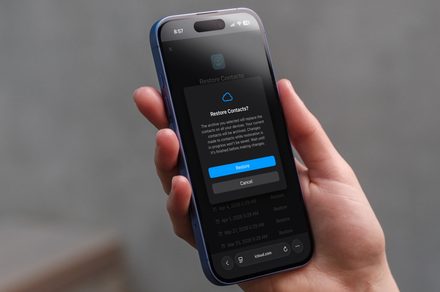
Step 4: Click on the menu dots in the top-right corner, scroll to the bottom, and open “Data Recovery.” Scroll down and tap on Restore Contacts.

Step 5: Now tap the Restore button next to the date and time when the contacts were deleted to restore them.

More techniques for restoring iPhone contacts
Here are some more things you can try:
- If the above techniques don’t work, you can also try to restore your phone from an iTunes backup, which will also have contact data.
- If you still have your old iPhone and haven’t changed many contacts since then, you can port them over or add important ones.
- You can try third-party iOS recovery tools.
Losing your contacts is stressful, but as you can see, getting them back is usually a quick fix. The key takeaway here is to make sure your contacts are always syncing with iCloud so you are never caught off guard again. And if you haven’t backed up your iPhone in a while, now is a great time to do it. Think of it as insurance you hope you never need, but will be very glad you have.