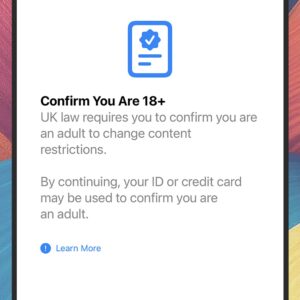
Alongside the new emojis, AI playlists, and other goodies that rolled out with iOS 26.4, Apple included a less-welcome upgrade for users in the UK: age verification.
Once the update has been installed, anyone in the UK with an iPhone has to verify how old they are. There’ll be a prompt to do this, and if that’s dismissed, there’s a persistent reminder in Settings. The same change is happening with iPads and iPadOS 26.4, but not with Macs.
If you’re in the UK and aren’t 18 or over (or can’t prove you are), then certain restrictions get applied—including filters on the kind of websites you can access and the content you can send in messages.
It’s an enforced requirement that hasn’t gone down well with users, but it’s something we might be seeing more of in the future. Whether or not you’re a UK user, here’s what you need to know.
Why this is happening

Credit: Lifehacker
Apple hasn’t said anything publicly about the new feature, but the messages inside iOS 26.4 say the age verification is required by UK law—though that’s not technically true (which is why we haven’t yet seen anything similar on Android). On the relevant Apple support page, the message is simply that age checks are now required for Apple accounts in the UK.
The UK government has enacted an Online Safety Act which came into force last year. This requires websites and apps containing adult content to verify the age of their users—but the burden for this currently falls on the sites and apps themselves. There’s no legislation that device makers have to apply checks too.
Having age checks at a device level would be a more straightforward approach to this (and is something sites like Pornhub have called for). Apple is likely trying to stay ahead of any future restrictions, too: Social media access for under-16s has already been banned in Australia, and the UK is currently trialing a similar idea.
How age verification works

Credit: Lifehacker
The age verification process can be launched from Settings in IOS, and will work with a credit card, driver’s license, or certain kinds of ID card. What you can’t use are passports or debit cards (which in the UK are much more common than credit cards), leaving some users unable to prove they’re over 18.
As a Brit, I’ve already verified my age—or had it verified for me, anyway. After tapping Confirm You Are 18+ in Settings and then Continue, I was told that “the length of time you have had an Apple account was used to confirm you are 18+” (and now I feel old). There was no need to scan an ID or register any credit card details.
For others, the process hasn’t been quite so smooth. Even those who do have a credit card or the right ID are experiencing problems with the scanning process, while non-drivers who have the financial sense not to spend on credit are pretty much stuck at this point. If Apple is testing the waters with this in the UK, it needs to reconsider how it’s implemented from a user-experience perspective.
What could be next

Credit: Lifehacker
Despite the inconvenience and privacy implications for users, there’s no doubt this is the direction we’re going in at this moment in time. Last month there was a landmark decision that ruled that Meta, Google, and other tech companies could be held responsible for mental health harms suffered by young users, and concluding that more needs to be done to protect children on these platforms.
Meanwhile, age authentication laws are spreading across states in the U.S., and it’s possible that Apple (and Google) will soon put the same age checks in place globally. There’s now growing concern over children accessing harmful content, and tech companies are rushing to protect themselves from accusations of negligence.
Groups such as the Electronic Frontier Foundation are against age verification, arguing that it hands over yet more personal and sensitive data to entities that may not keep it safe or use it ethically. Others believe this is absolutely necessary, with UK regulator Ofcom calling Apple’s iOS 26.4 move “a real win for families and children.”