
AI can conjure photorealistic faces and dreamy landscapes in seconds, but ask it to write “Happy Birthday” on a cake and things get weird fast. The culprit is how these models learn to read, and the solution is trickier than it seems.
Imagine you’ve just prompted your chosen AI image generator to create a stunning fashion advertisement for a major platform. The colours are gorgeous, the composition is beautifully balanced, and the lighting would make any photographer jealous. There’s just one small problem: the text reads “SHOP NUG.” Close, but not quite.

If this sounds familiar, you’re certainly not alone. Despite remarkable leaps in AI-generated imagery over the past few years, text rendering remains the Achilles’ heel of even the most sophisticated models. And here’s the kicker: whilst generation has been steadily improving, editing that garbled text after the fact is proving to be an even thornier challenge.
So, what gives?
The fundamental mismatch
The truth is, AI image generators don’t actually “read” text. At all. When you ask DALL-E or Midjourney to include words in an image, the model isn’t processing language. It’s simply pattern-matching shapes it has seen before in training data.
Traditional text-to-image models like Stable Diffusion perceive text as a collection of pixels and visual elements to composite into the scene, not as meaning-conveying strings of characters. The model has seen millions of images containing billboards, book covers, and street signs, but it was never explicitly taught what those squiggles mean or how they follow strict rules of spelling and grammar.
This creates a fundamental mismatch. Text is precise and unforgiving: one wrong letter changes everything (“STOP” versus “ST0P”, anyone?). Images, by contrast, are fluid and interpretive. A face can be slightly asymmetrical and still look human. A landscape can have unusual lighting and still feel real. But misspell a single word? The illusion shatters.
How diffusion actually works (in broad strokes)
To understand why text is such a headache, it helps to peek behind the curtain at how these models generate images in the first place.
Most modern AI image generators use something called diffusion models. The basic idea is surprisingly elegant. During training, the model learns to gradually add noise to images until they become pure static, then reverses this process by removing noise step-by-step to recover coherent pictures.
When you type a prompt, it gets processed through a text encoder (typically CLIP) that converts your words into numerical representations. These embeddings then guide the denoising process, steering the random noise towards something resembling your description.
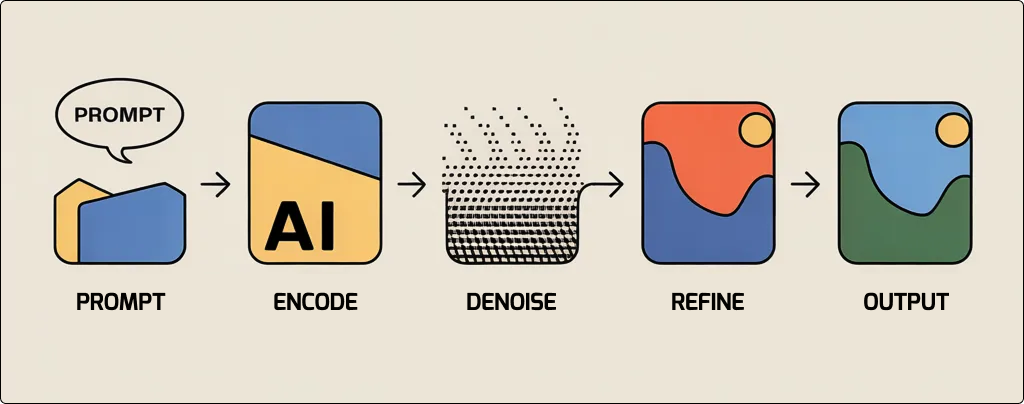
The problem? Fine details like individual letters are treated as low-priority during the early denoising steps. Errors get “baked in” early and become incredibly difficult to correct later in the process. The model is essentially guessing letter shapes with no feedback loop to verify whether its guess makes any linguistic sense.
There’s also the tokenisation issue. When CLIP processes text, it splits words into tokens, and sometimes those splits break apart the very concepts it’s trying to understand. “Deep focus,” for instance, gets tokenised into separate pieces, losing the photographic meaning entirely. The same fragmentation happens with the text in your images, making coherent words harder to reconstruct.
Generation is getting better — editing, not so much
Now for some good news: text generation in AI images has improved dramatically. Newer models are making genuine strides, and the gap between “absolutely wrong” and “actually usable” has narrowed considerably over the past year or so.
The improvement isn’t accidental. Companies have specifically invested in solving this problem, recognising that text accuracy is a dealbreaker for commercial applications. After all, nobody wants to hand a client an otherwise perfect AI-generated mockup with “BSET PRCIES” plastered across it.
Ideogram, a platform built specifically with typography in mind, is said to be achieving now roughly 95% accuracy on text prompts, a remarkable leap compared to Midjourney’s approximately 40%. The company claims its latest model reduces text error rates by nearly half compared to DALL-E 3. For designers who need readable words on posters, logos, and social media graphics, this could be genuinely transformative.
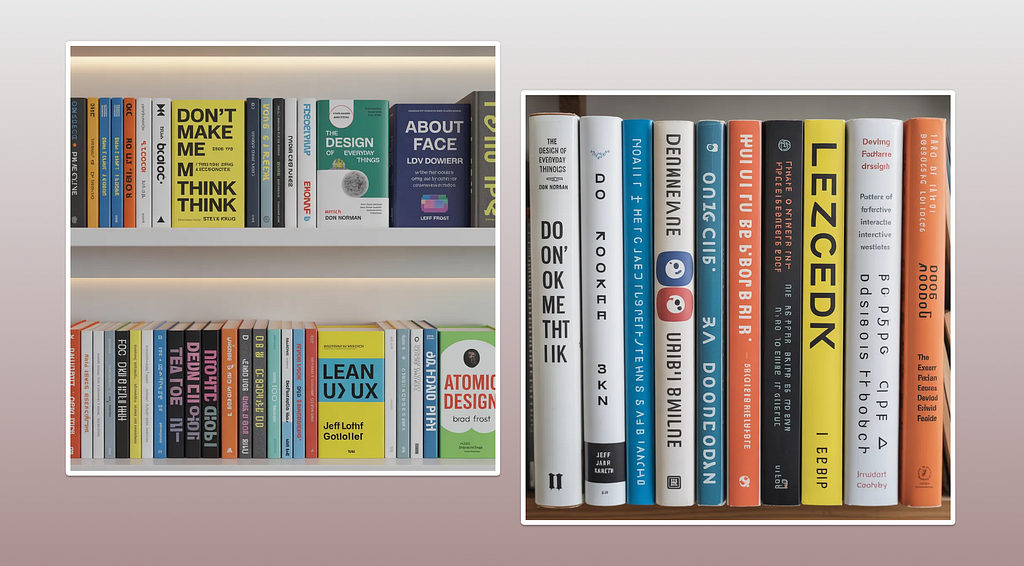
But does it really stand up to scrutiny? In the first example below, I asked it to generate a bookshelf with popular titles on product design, with the text clearly visible. The results showed significant errors (“Don’t Make Me Think” became “DON’T MAKE ME M THINK THINK,”) and other titles were similarly garbled. Next, I provided a specific list of books and authors. The outcome? Still riddled with text errors, suggesting that Ideogram’s touted 95% accuracy claim falls short in actual use cases that require heavy text generation. It may fare better with simpler, single-text prompts, but complex scenarios remain problematic.
Recraft V3, another newcomer, has also positioned itself as a leader in accurate text rendering, claiming “flawless results with every prompt.” A bold assertion, but the benchmarks suggest it’s not far off.
So if generation is improving, why is editing still such a mess?
The short answer: context preservation
When generating an image from scratch, the model has complete creative freedom. It can place text wherever it likes, choose fonts that play nicely with its capabilities, and build the entire composition around what it knows it can render well.
Editing is a different beast entirely. When you ask an AI to fix garbled text on an existing image (through inpainting or other techniques) the model must preserve everything around the text whilst only modifying the specific region you’ve highlighted. This is where things get complicated.
Research on latent diffusion models for inpainting shows that when applied to large or irregular regions, these models “tend to generate blurry or contextually ambiguous reconstructions.” The model fills in details based on surrounding context and learned patterns, which simply isn’t precise enough for the exact letter shapes that text requires.
In practical terms? The AI might successfully remove your gibberish text, but when it tries to paint new letters into that space, it struggles to match the exact style, lighting, and perspective of the original image. The result often looks patched rather than seamless.
Why you’re not imagining things
If editing feels harder than generating, the data backs you up. A 2025 benchmark study published in MDPI evaluated multiple AI models across text accuracy metrics and found that all major platforms (including DALL-E 3, Ideogram, and Stable Diffusion) face “significant challenges with text accuracy” across domains like code, chemical diagrams, and multi-line text.
The scores are telling. For code-related text, Stable Diffusion scored just 1.25 out of 5 for text accuracy. Even Ideogram, the supposed text champion, managed only 1.75 in the same category. When it comes to complex, structured text requiring precise formatting, all models struggle.
Platform comparisons in 2025 reflect this reality. Image-to-image tools vary significantly, with Midjourney notably lacking “true inpainting and transformation controls.” For users who do heavy editing work, local Stable Diffusion with ControlNet remains the go-to option. However, that requires technical expertise most casual users might simply not have.
The workarounds (for now)
Until AI cracks this particular nut, what’s a designer to do? A few strategies have emerged, each with their own trade-offs.
Use text-first generators. If you know you’ll need accurate typography, start with Ideogram or similar text-focused tools rather than trying to force words into Midjourney’s artistic outputs. It’s a case of picking the right tool for the job; you wouldn’t edit a feature film in PowerPoint.
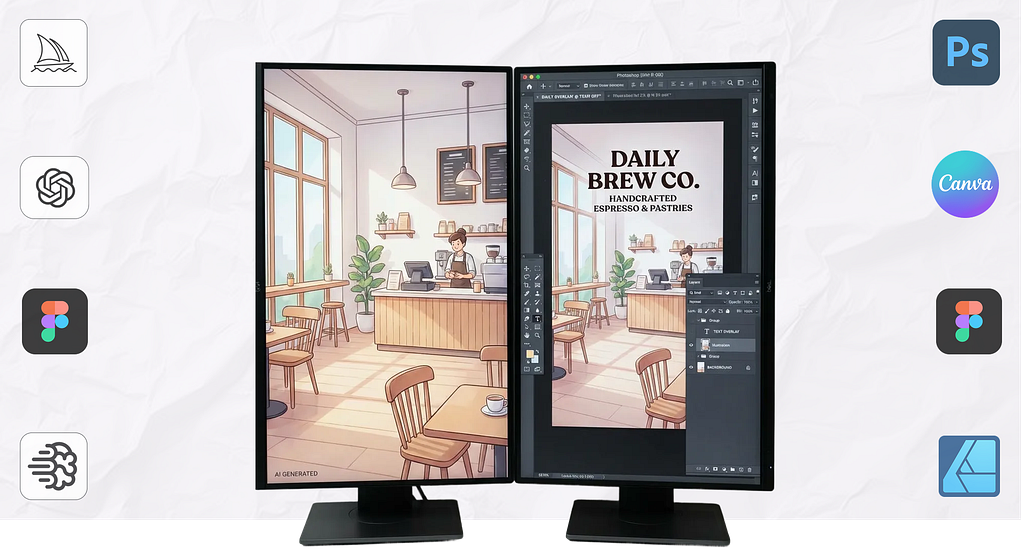
Generate first, add text later. Many professionals now create their AI imagery text-free, then overlay typography using traditional design tools like Photoshop, Canva, or Figma. It’s an extra step, but the results are far more reliable. This approach also gives you complete control over font selection, kerning, and placement; things AI still handles clumsily at best.
Try dedicated fix-it tools. Platforms like Storia Lab’s Textify or Canva’s Grab Text tool can identify gibberish text and attempt to replace it. Results vary (patience is required) but for simple corrections, they can save considerable headaches. Just don’t expect miracles with complex multi-line text or heavily stylised typography.
Embrace the hybrid workflow. As one industry comparison put it, “many professionals use both platforms,” generating artistic foundations in Midjourney, then handling typography in Ideogram. It’s not elegant, and it requires subscriptions to multiple services, but it works. Think of it as assembling a toolkit rather than searching for a single magic wand.
Keep expectations realistic. Perhaps the most important strategy is simply managing client and stakeholder expectations. AI-generated imagery is powerful, but it has clear limitations. Flagging potential text issues upfront saves awkward conversations down the line.
What this means for designers and UX professionals
Beyond the technical challenges, there’s a broader conversation here about workflow and expectations. As AI tools become more embedded in creative processes, understanding their limitations isn’t just nice-to-have knowledge; it’s essential professional competence.
For UX writers and content designers, this has particular relevance. If you’re working with teams that use AI-generated imagery, you need to factor text limitations into your content strategy. That punchy headline might look great in a mockup, but will it survive the AI rendering process intact? Sometimes the answer is simply: maybe not.
And let’s be honest, there’s something almost poetic about AI mastering the creation of human faces whilst fumbling with human writing. It’s a reminder that these tools, however impressive, aren’t magic. They’re sophisticated pattern-matching systems with specific strengths and equally specific blind spots.
What’s on the horizon?
The research community hasn’t given up. Several promising approaches are in development:
- Hybrid AI systems that generate a base image through one model, then overlay text using a separate, specialist module designed specifically for accurate placement. Think of it as mimicking how human designers work: creating the visual first, then adding captions as a final step.
- Better training data. Most current datasets lack properly labelled, structured text within images. Training on annotated text data could help models understand not just where text appears, but what it actually says and how words are properly formed.
- Vector-based rendering. Some teams are exploring ways to separate text from raster imagery entirely, treating typography as a discrete, editable layer rather than baking it into pixels. This would fundamentally change how text is handled, moving from pattern-matching to something closer to actual typesetting.
- OCR feedback loops. Imagine a model that generates text, runs optical character recognition to check its own work, and iterates until the spelling is correct. This kind of self-correction mechanism could dramatically reduce errors, though it would add computational overhead.
Spelling it out
AI image generation has come a long way in a remarkably short time. Photorealistic faces, impossible architecture, dreamlike landscapes — all conjured from a few words typed into a prompt box. But text, that most human of visual elements, remains stubbornly resistant.
The core issue isn’t laziness or neglect. It’s architectural. Diffusion models were designed to see images holistically, not to parse the precise, rule-bound structures that make written language work. Generation is improving because researchers are training dedicated models for the task. Editing lags behind because preserving context whilst fixing details is a fundamentally harder problem.
For now, the practical advice is straightforward: plan for text limitations, use the right tool for the job, and don’t be afraid to bring in traditional design software for the finishing touches. AI is brilliant at many things. Fixing spelling errors in images just isn’t one of them… yet.
Thanks for reading! 📖
If you liked this post, follow me on Medium for more!
References & Credits:
- (2025). Challenges in Generating Accurate Text in Images: A Benchmark for Text-to-Image Models on Specialized Content
- Stable Diffusion Art. (2024). How Does Stable Diffusion Work?
- Why AI Still Struggles with Text in Image Generation
- THE DECODER. (2024). Ideogram 1.0 outshines Midjourney and DALL-E 3 with impressive text rendering
- (2026). Ideogram vs Midjourney: 50+ Hours Testing
- (2025). Comparing Text to Image Models and Providers
- Frontiers in AI. (2025). High-resolution image inpainting using a probabilistic framework
- (2025). Image-to-Image AI Comparison 2025
- (2024). I Tested 4 Tools to Fix Gibberish Text in AI-Generated Images
Lost for words: why text in AI images still goes wrong was originally published in UX Collective on Medium, where people are continuing the conversation by highlighting and responding to this story.