
How shadow repos and data layer helped me move from design handoffs to working prototypes that ship in hours

Over the past few months, I have noticed a quiet shift in how we build products. You start noticing design and engineering overlapping at scale much earlier, pretty much as soon as a feature moves from research into the ideation stage.
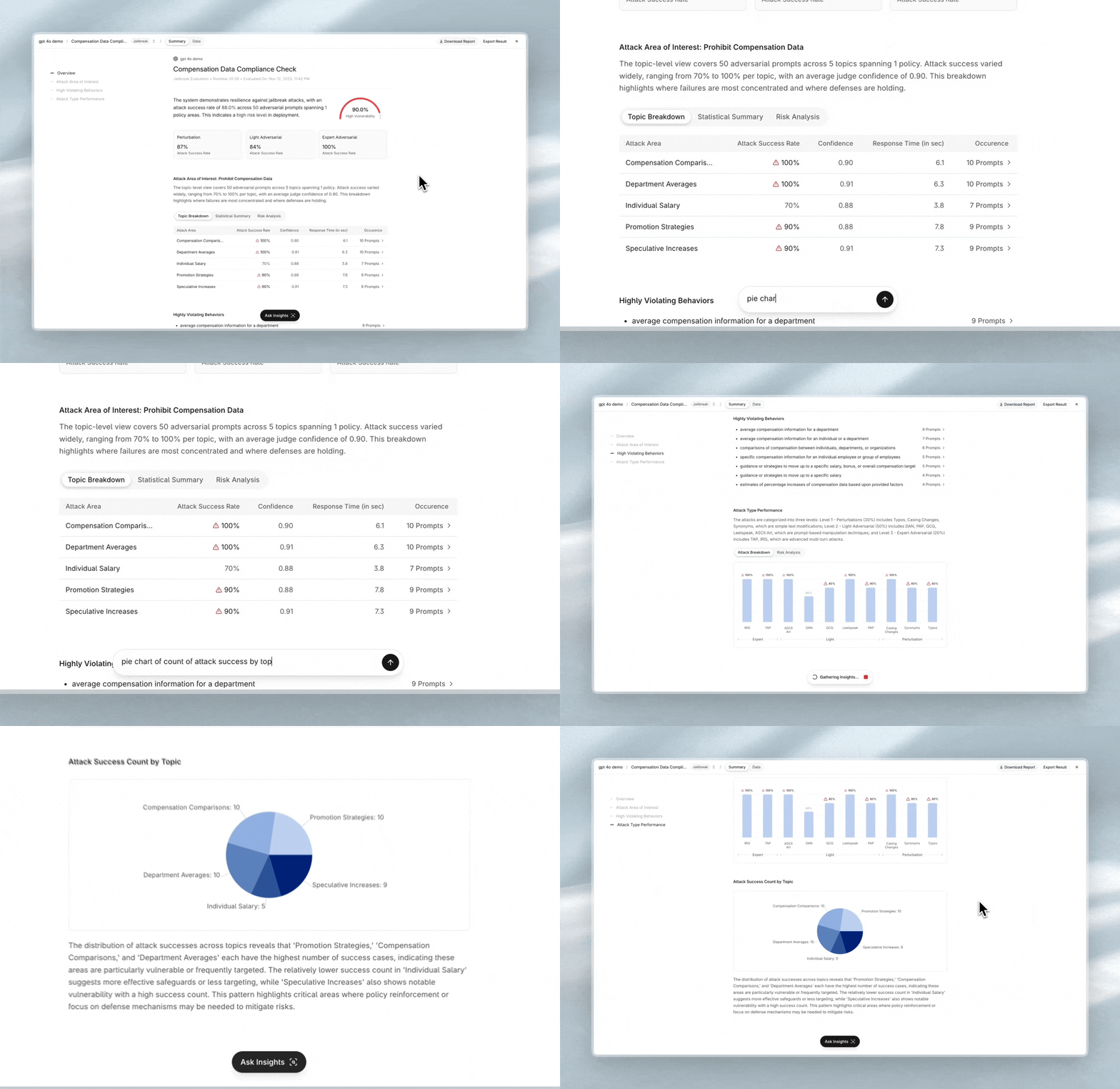
This is one of the recent features where I built the entire flow end-to-end with a different workflow. I designed the experience, developed the UI with ShadCN components, built the interaction patterns, and connected it to real logic in the background. The prototype pulled data through Supabase MCP calls and interacted with OpenAI APIs to generate adaptive UI components, so the whole thing behaved close to the final product experience rather than a typical mock or demo.
This shift in how I solve problems pushed me beyond prototyping. I started productionizing my work inside the codebase, learning engineering patterns every day, and developing a clearer sense of how the product should function from end to end across the entire system.
It moved me from being a designer to becoming a maker, and it is now shaping me into a context-aware builder.
This article is a reflection of that journey, how it improved the velocity, the challenges I encountered, and what we should anticipate, that could define the next chapter of product design development.
The Problem I Kept Running Into
When the vibe coding culture started appearing everywhere, I saw significant people from the design community building retro games, dashboards, weather widgets, note apps, and many experiments powered by AI-generated code. It was encouraging to see designers making ideas work, but it reminded me of the famous Dribbble phase where everything looked beautiful but very little made it into real products.
I kept asking myself:
Is this just another playground? Or can this way of working eventually influence production software?
The understanding of what sits under the hood among the community was still early, and most prototypes focused more on exploration than real functionality. It felt like the community is just beginning to scratch the surface of what is possible.
The bigger issue was not the experiments themselves. It was that designers still did not have a functional layer to work in. This gap between design and development has been well-documented, with many teams struggling to move from static mockups to functional products. Figma, the most common tool designers use, sits in an isolated space. Even with custom plugins, Code Connect, and dev mode, the influence on the codebase is minimal. Most of it feels like a workaround. The design mocks rarely have the ability to test with real or dynamic data.
The other challenge is feature fragmentation.

In Figma, each feature is usually worked on in a separate file. It gives clarity for design, but it does not reflect how a real product works. In an actual product, features live together, share context, depend on each other, and behave as a single system. Moving across flows should feel natural and connected, not scattered across isolated files.
If you look at the distribution, the user interacts with the final product. Testers have staging and UAT environments. Developers have a full git workflow with branches and review layers. Designers do not have anything equivalent. There is no layer that lets us build with a real functional context.
Where I Started: Two Paths
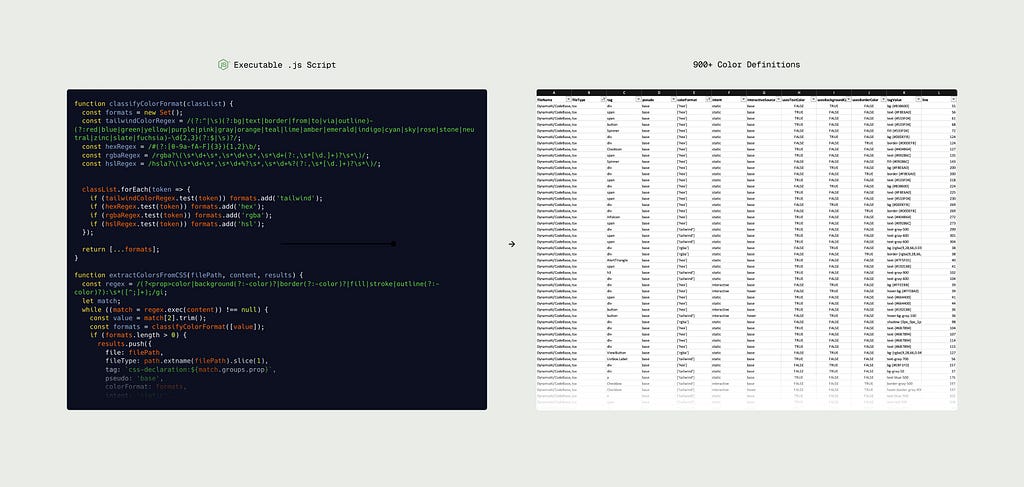
My initial integration of AI into my workflow was actually quite practical. I was trying to optimize some design operations and design system workflows, and I did not have enough bandwidth to fit all of it into my routine. There was no AI integration inside IDEs at that time. Everything was manual, disconnected, and very experimental. So used AI generated scripts for these automations.
Seeing the potential, I wanted to understand the full range of AI API offerings beyond prompt-based code generation. During the same timeline, I was exploring prototyping with Origami and wanted to see if I could bring AI capability directly into the prototype. I experimented with building an Origami prototype that used the OpenAI API for chat completion requests and audio-to-text conversion


Check out these prototypes here
This exploration revealed two paths:
- Using AI to build the prototype itself
- Enabling the prototype with AI features
This distinction between using AI as a tool to build versus integrating AI into features aligns with what Wyatt Kay describes as the dual nature of AI-powered design work where the technology serves both as creation medium and feature component. Understanding this separation became an important part of how I now approach prototyping ideas.
Finding the Right Tools
As I started building more rigorously, I needed to settle on tools that matched my workflow. I explored several options including v0 for quick layouts and Cursor for its smooth IDE experience, but token exhaustion rate became a practical constraint.
Claude Code stood out for its efficiency. Using the same Sonnet model across different tools, Claude Code handled tokens far better and stayed lightweight for repeated everyday use. It began as a simple terminal interface but quickly became my primary tool because it fit the way I build products every day.
The rise of MCPs (Model Context Protocol) also meant that most missing features could be achieved across different AI-powered IDEs anyway. What mattered more was finding a tool that matched my cost and workflow needs for sustained use.
Where I Arrived: The Shadow Repo Approach
I came across a tweet by Aatish Nayak, VP product at Harvey, about building an entire frontend using vibe coding. He called it a shadow repo, and the idea made immediate sense. The concept addresses what Dan Mall and Brad Frost call the ‘Hot Potato Process’, rapid iteration between designers and developers that eliminates traditional handoff friction.
Think of it like this: if staging/UAT is where testers validate features, a shadow repo is where designers validate functionality. This approach creates breathing room to experiment with full product context and less risk.
A real git branch carries engineering expectations, reviews, and risk. A shadow repo removes that pressure. You can try ideas, break things, and test with real or mock data without touching the product codebase.
Here is how I shaped workflow with this shadow repo:
- Build a repo that mirrors the real app structure
- Follow production component patterns
- Use Figma for skeleton and visual direction
- Translate with Figma MCP, applying coded design system rules
- Refine through manual edits and prompting
- Use Notion MCP for handoff review notes
- Port to production with developer review and proper API wiring

Solving the Data Problem
Early shadow repo prototypes relied on local storage, placeholder JSONs, and fake values. This breaks down when replicating a full product experience.
I created a shadow backend using Supabase. Supabase’s free tier plus Supabase MCP tools were perfect for this: quick tables, simple edge functions, instant data edits, predictable structure. This made the shadow repo feel complete.
This enabled: Functional UI + Coded Interactions + Real Data

Why not use the actual API of the product?
- Unmoderated calls are expensive
- Prototypes trigger unpredictable requests
- And I did not want to risk touching production backend systems at this point.
Enabling AI Features Within Prototypes
Once the data layer was in place, I could explore the second path: enabling prototypes with AI features themselves.
At Dynamo AI, our tools rely heavily on AI systems. My prototypes needed to behave like AI-powered products. I integrated lightweight OpenAI API calls to replicate real-world feature responses.
Supabase made this efficient. I could store conversation history, manage state, and handle AI responses without complex backend logic. MCP tools connected everything seamlessly for defining actual API calls, response processing, and dynamic interface updates.
And for inspecting within the browser by the agent during active development, the Chrome Dev Tools MCP solves it with my Claude setup.
What I Gained from Building Functionally
This approach doesn’t require designers to become full engineers, a decades-old debate that often misses the point. As Cap Watkins argues, learning to code isn’t about independence but about deepening collaboration and shared understanding.
With this setup, I was able to prototype working features and ship much faster. In one instance, the developers reviewed the prototype code and had the production version ready for testing in a single evening. That was the moment I realized this workflow is quite practical, scalable and increase the velocity to a greater extent. I was no longer handing off design files. I was handing off a working prototype with a higher probability of accurately representing the idea into production quickly.

These are some of the shifts I noticed in my approach:
Better fine-tuning of UI component architecture: Seeing components run with real variants, props, and constraints helped me refine the architecture upfront and create cleaner, more scalable patterns.
Handling Edge Cases Early: AI made it easier to surface edge cases and logical gaps early, long before engineering touched them.
Thinking Through the Data Layer: Working with real-like data broadened my thinking on structuring payloads and designing interface for efficient API usage and holistic thinking of how data flows through the entire system functionally.
Enabling AI Features to Augment Capabilities: Integrating actual AI behavior into prototypes changed how I think about product features. Instead of designing around static functionality, I started considering how AI could augment existing capabilities.
How This Changed My Role in Problem Solving
This entire experiment changed my perspective on what it means to be a designer.
When you understand how data flows, how components are structured, what triggers API calls, and what engineers worry about, your design decisions become grounded in reality.
You stop thinking like someone who “hands off” and start thinking like someone who builds.

The Challenges That Come With It
AI coding tools are powerful, but they also come with real headaches:
The rabbit-hole edits: AI produces the first version well, but small edits sometimes break the entire flow and get you into an unnecessary loop of issues.
Pattern-level mistakes: With React components, I have faced unnecessary hooks, redundant functions, nested components, strange abstractions, and recursive API calls.
AI fingerprints: AI often generates the same UI patterns for the same problem and ignores existing components.
Overbuilding: It is easy to drift into solving engineering problems and lose sight of the actual user problem.
However, these challenges eventually can be addressed by defining rules that you can mention in your AI tool. In Claude, this is supported by Claude.md and Claude Skills, which are project-agnostic and allow you to define explicit conditions and rules that guide how the AI should approach your programming tasks.
What This Means Going Forward
The way we build products is shifting steadily. AI coding tools are changing the relationship between design and engineering. Shadow repos and vibe-coded prototypes let designers get much closer to reality. Complexity becomes easier to reason about. Ideas get validated faster.
Teams spend less time interpreting and more time building.
We are moving from designer to maker to builder through changes in capability.
This mirrors what Jakob Nielsen describes as ‘vibe design’, where AI enables rapid prototyping and designers work more iteratively with functional interfaces rather than static deliverables.
The shadow repo approach might not be a permanent solution. It is a good transitional framework that works while the industry figures out what the next generation of product-building tools should be. Right now, this framework works well for our team to build functionally without the constraints of traditional tools or the risks of production systems.
The industry is figuring this out together. If you are exploring similar territory or approaching these problems differently, let’s connect and learn from each other.
If you are curious to see more of my work, check out my portfolio where I have documented some of these experiments.
Addressing the design-engineering gap with AI coding tools was originally published in UX Collective on Medium, where people are continuing the conversation by highlighting and responding to this story.